---
title: Cruiser Check Overview
description: Cruiser Check Overview
---
[Skip to content](https://kb.arms.com/dhq/cruiser-check-overview#main-content)
English
Show submenu for translations

Open main navigation
Close main navigation
- English
Show submenu for translations
- Contact us
Contact us
How can we help you?
- There are no suggestions because the search field is empty.
1. [DHQ](https://kb.arms.com/dhq?hsLang=en)
2. [User Guides](https://kb.arms.com/dhq/user-guides?hsLang=en)
3. [Cruiser Check](https://kb.arms.com/dhq/user-guides?hsLang=en#cruiser-check)
# Cruiser Check Overview
### Cruiser Check Overview
Created by Greg Katz, Modified on Wed, 2 Apr, 2025 at 10:56 AM by Greg Katz
**Overview:**
DHQ’s Cruiser Check Sheet is a module designed to get rid of all the paper checklists and efficiently track all your cruiser maintenance in a digital environment.
This module can document any deficiencies with the vehicle and send email alerts to those people in charge of handling those deficiencies. It will also track mileage and provide reminders for oil changes and inspection stickers (if needed).
Please provide us with email contacts for the individuals you would like to receive those email alerts. You could give us different email addresses for different deficiencies—for example, you want the IT contact to get emails concerning MDT’s and radios, and you want the mechanic to get emails for bodywork damage, tires, turn signals, oil changes etc. and you want the medical team to get emails for the first aid kit—we can set all that up for you. Some departments want all deficiencies to go to one person or a group of people, and others prefer specific issues to be directed to specific personnel. These are agency specific and can be forwarded to ARMS support to configure.
Documentation below may vary from your actual agency as this module's content is driven by actual agency needs.
**How To:**
**For Officers** on the DHQ homepage, click on “Patrol Division” at the top of the page. For some customers, it might simply read “Cruiser Check Sheet” at the top of your DHQ homepage:

Once you are in the Patrol Division/Cruiser Check Sheet, you must click on “Add Cruiser Check Sheet” on the left navigation to fill out a new Cruiser Check Sheet:
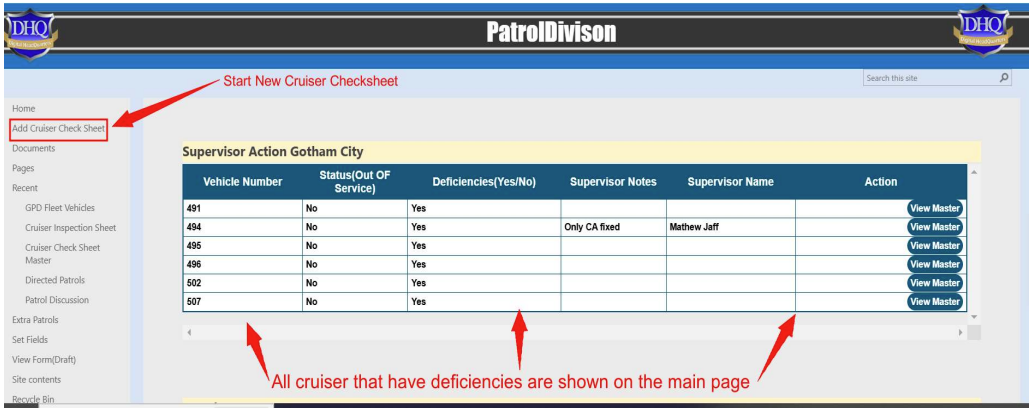
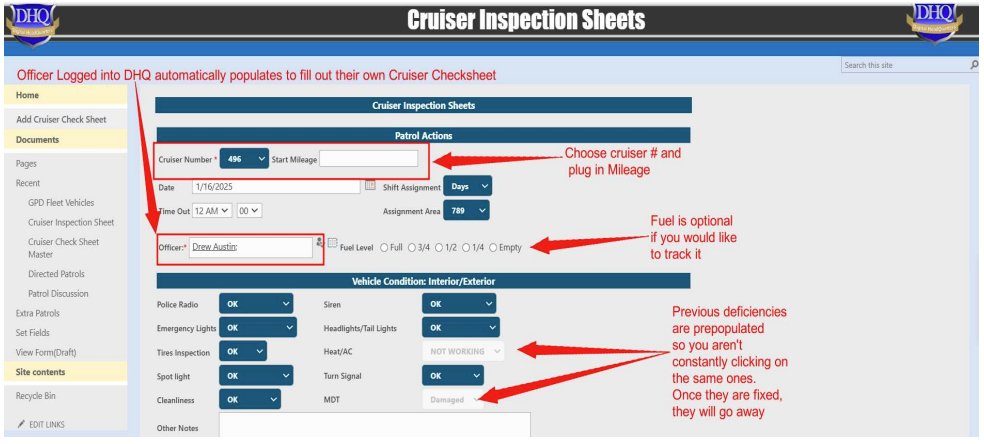
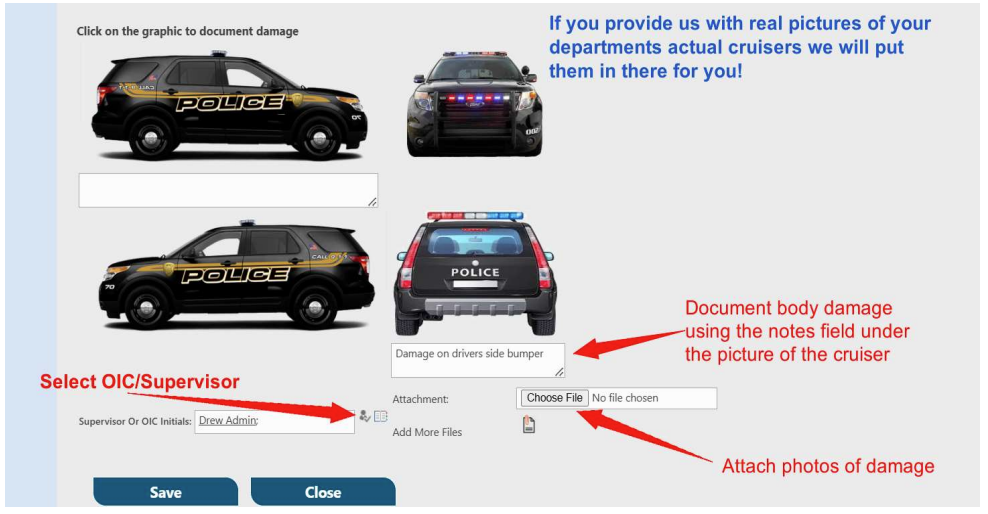
This is the screen that you will perform the Cruiser Check Sheet. Here you will choose the cruiser, document the mileage, and perform the maintenance check for deficiencies.
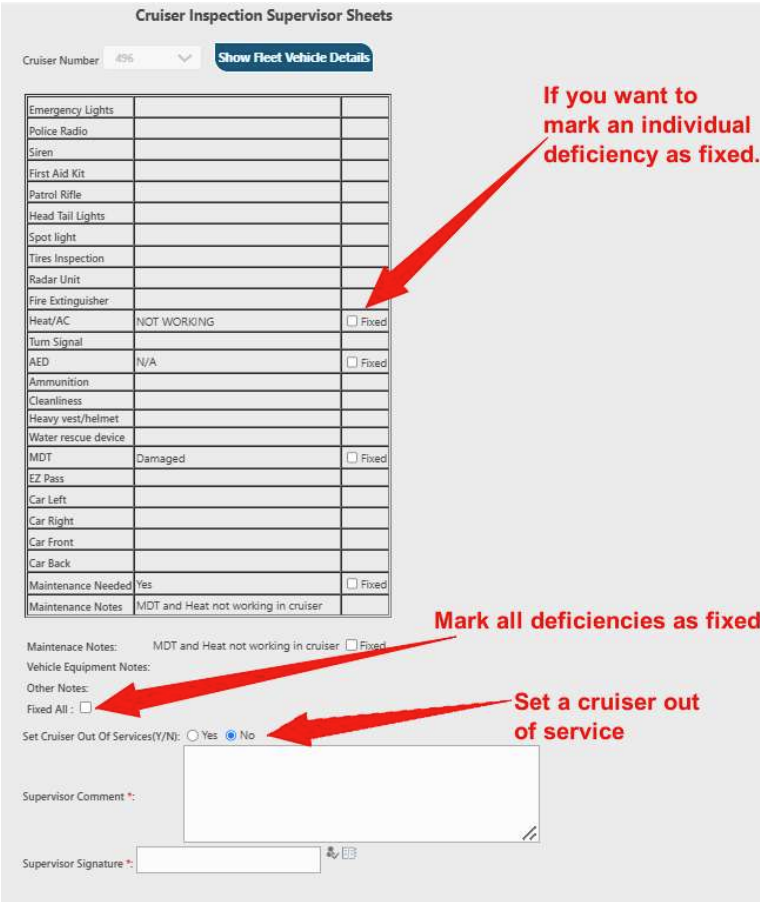
**For Fleet Managers/Supervisors -** updating the maintenance and deficiencies. You will use the main page:
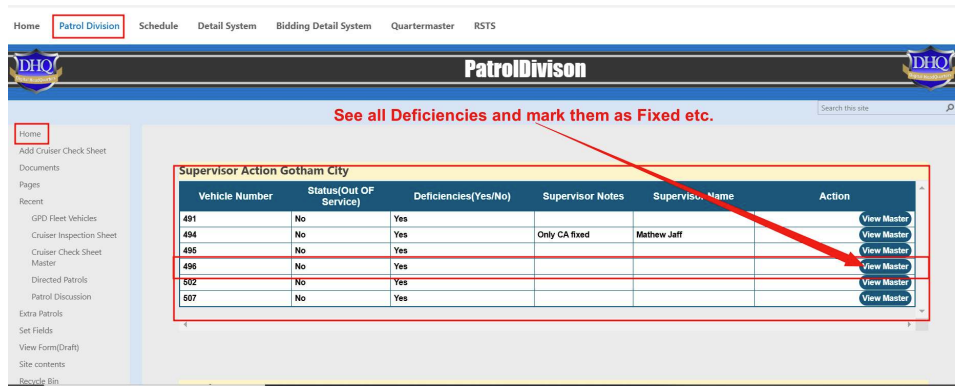
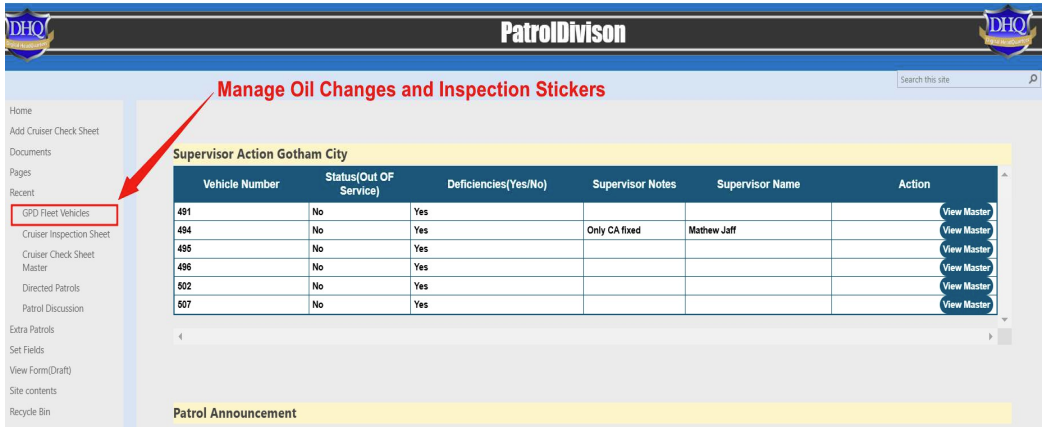
**For Fleet Managers/Supervisors** Managing Oil Changes/inspection stickers You will use the Fleet Vehicles tab on the left navigation to manage oil changes and inspection stickers.
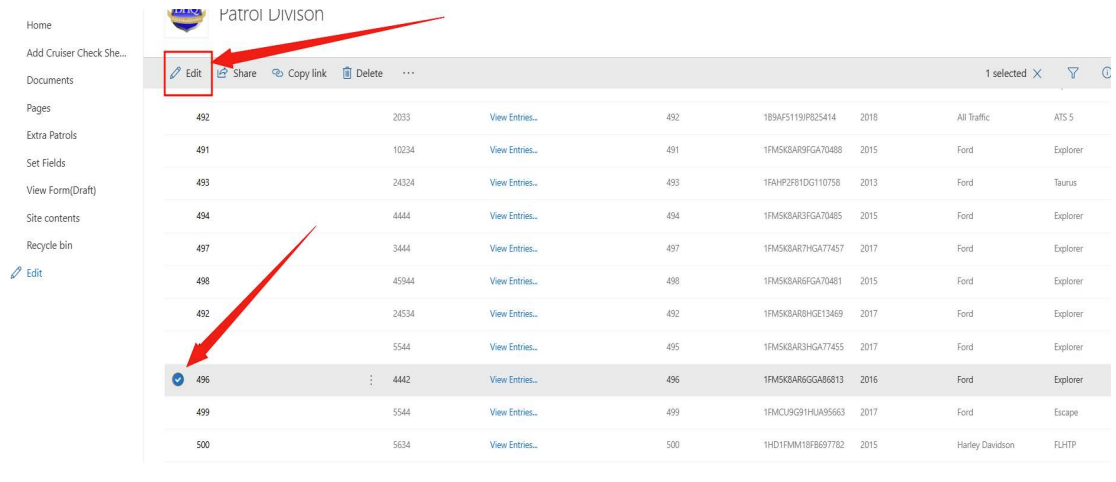
Choose the cruiser and click "Edit"
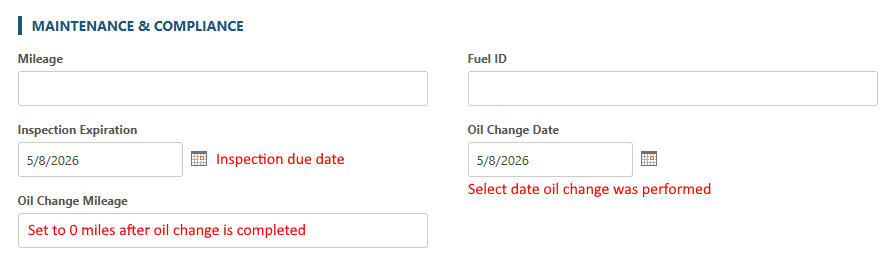
This is where you will set the date of the inspection for this vehicle. 30 days prior to the inspection date, the person in charge will receive an email that the inspection is due in 30 days.
This is the page where you manage oil changes. You will reset the “oil change mileage” to 0 every time you perform an oil change.
In order to receive an email alert for when the next oil change is due, you must provide us the oil change interval in miles driven. Typically, 3,000 but every department is different.
- [Administration Guides](https://kb.arms.com/dhq/administration-guides?hsLang=en#main-content)
- [AWA Roll Call](https://kb.arms.com/dhq/administration-guides?hsLang=en#awa-roll-call)
- [Cruiser Check](https://kb.arms.com/dhq/administration-guides?hsLang=en#cruiser-check)
- [Detail Bidding](https://kb.arms.com/dhq/administration-guides?hsLang=en#detail-bidding)
- [Document Sign Off](https://kb.arms.com/dhq/administration-guides?hsLang=en#document-sign-off)
- [Forms Based Authentication](https://kb.arms.com/dhq/administration-guides?hsLang=en#forms-based-authentication)
- [Microsoft Office Settings](https://kb.arms.com/dhq/administration-guides?hsLang=en#microsoft-office-settings)
- [Mobile App](https://kb.arms.com/dhq/administration-guides?hsLang=en#mobile-app)
- [Office 365/Azure Connection](https://kb.arms.com/dhq/administration-guides?hsLang=en#office-365-azure-connection)
- [Passwords](https://kb.arms.com/dhq/administration-guides?hsLang=en#passwords)
- [Permissions](https://kb.arms.com/dhq/administration-guides?hsLang=en#permissions)
- [Personnel Cards](https://kb.arms.com/dhq/administration-guides?hsLang=en#personnel-cards)
- [Smart Police](https://kb.arms.com/dhq/administration-guides?hsLang=en#smart-police)
- [Scheduling](https://kb.arms.com/dhq/administration-guides?hsLang=en#scheduling)
- [Training](https://kb.arms.com/dhq/administration-guides?hsLang=en#training)
- [Quartermaster](https://kb.arms.com/dhq/administration-guides?hsLang=en#quartermaster)
- [Register New User](https://kb.arms.com/dhq/administration-guides?hsLang=en#register-new-user)
- [User Guides](https://kb.arms.com/dhq/user-guides?hsLang=en#main-content)
- [AWA Roll Call](https://kb.arms.com/dhq/user-guides?hsLang=en#awa-roll-call)
- [Cruiser Check](https://kb.arms.com/dhq/user-guides?hsLang=en#cruiser-check)
- [Event Tracking](https://kb.arms.com/dhq/user-guides?hsLang=en#event-tracking)
- [Messaging](https://kb.arms.com/dhq/user-guides?hsLang=en#messaging)
- [Mobile App](https://kb.arms.com/dhq/user-guides?hsLang=en#mobile-app)
- [Safe Watch](https://kb.arms.com/dhq/user-guides?hsLang=en#safe-watch)
- [Smart Police](https://kb.arms.com/dhq/user-guides?hsLang=en#smart-police)
- [Scheduling](https://kb.arms.com/dhq/user-guides?hsLang=en#scheduling)
- [Training](https://kb.arms.com/dhq/user-guides?hsLang=en#training)
- [Quartermaster](https://kb.arms.com/dhq/user-guides?hsLang=en#quartermaster)
- [Document Sign Off](https://kb.arms.com/dhq/user-guides?hsLang=en#document-sign-off)
- [DHQ Modules](https://kb.arms.com/dhq/dhq-modules?hsLang=en)
[](http://arms.com)
[mailto:email@email.com](mailto:email@email.com)
Copyright © 2026, End2End Public Safety