
Forms Based Authentication - Resetting and Changing User Passwords
Created by Greg Katz, Modified on Tue, 8 Jul, 2025 at 8:40 AM by Greg Katz
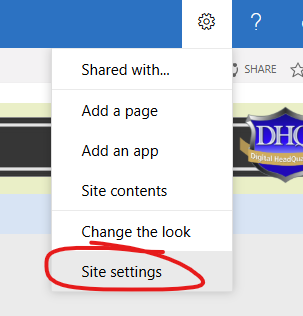
To reset a user password go to the Forms Based Authentication (FBA) User Management module. To access go to "Site Settings" from the main menu:
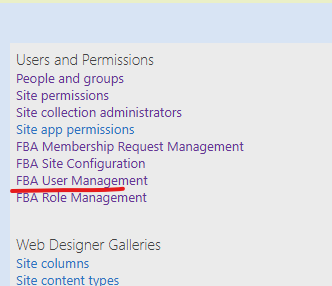
Then click on "FBA User Management":
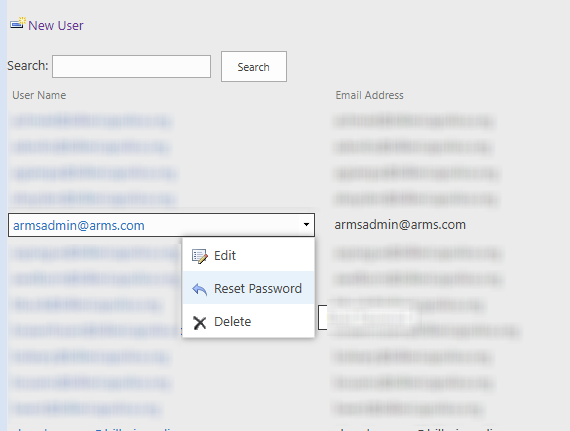
Roll your mouse over the user account and access the "Reset Password" link:
The DHQ Admin can reset to a random generated password or chose to set it manually and email it by checking the box shown below:
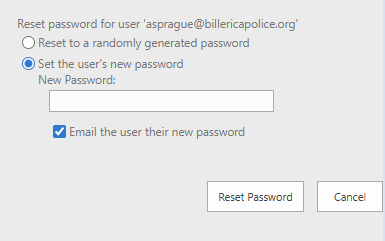
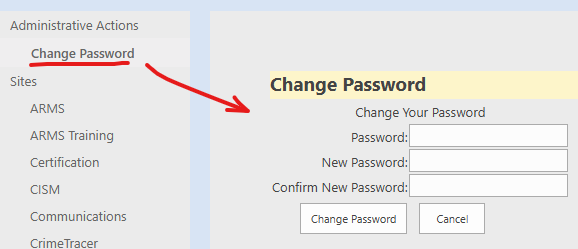
If an agency chooses to email a user their password, the user should be required to immediately change it after logging in. The user should be directed to the "Change Password" link on the agency's DHQ site.
Note: Password complexity policy is determined by each agency during the on-boarding process and may be changed at any time by coordinating with ARMS support.