---
title: Call to Citation Linkage
description: In-Synch
---
[Skip to content](https://kb.arms.com/in-synch/call-to-citation-linkage#main-content)
English
Show submenu for translations

Open main navigation
Close main navigation
- English
Show submenu for translations
- Contact us
Contact us
How can we help you?
- There are no suggestions because the search field is empty.
1. [In-Synch](https://kb.arms.com/in-synch?hsLang=en)
2. [Knowledge base1](https://kb.arms.com/in-synch/knowledge-base1?hsLang=en)
3. [Internal Wiki](https://kb.arms.com/in-synch/knowledge-base1?hsLang=en#internal-wiki)
# Call to Citation Linkage
No recent searches
Popular Articles

Sorry! nothing found for
### Call to Citation Linkage
Created by Russ Hartle, Modified on Tue, 11 Nov, 2025 at 10:03 AM by Russ Hartle
### Call Stub Setting
The setting “MakeCallStub = 1” can be added to the ecite section of the in-synch.ini to create a call from the citation. The process will port the following information from the citation to the call.
- Assigned Officer
- Municipality
- Address Description
- Vehicle
- Defendant
- Date Reported
If the agency desires a call type on the call stub, it is now possible. Add the following line in the “\[ECITE\]” section of the in-synch.ini. The value on the right must match the description of the call exactly. (This feature is only available in executables dates 03/28/17 and greater.)
### Cranberry Call to Citation Mapping Tool
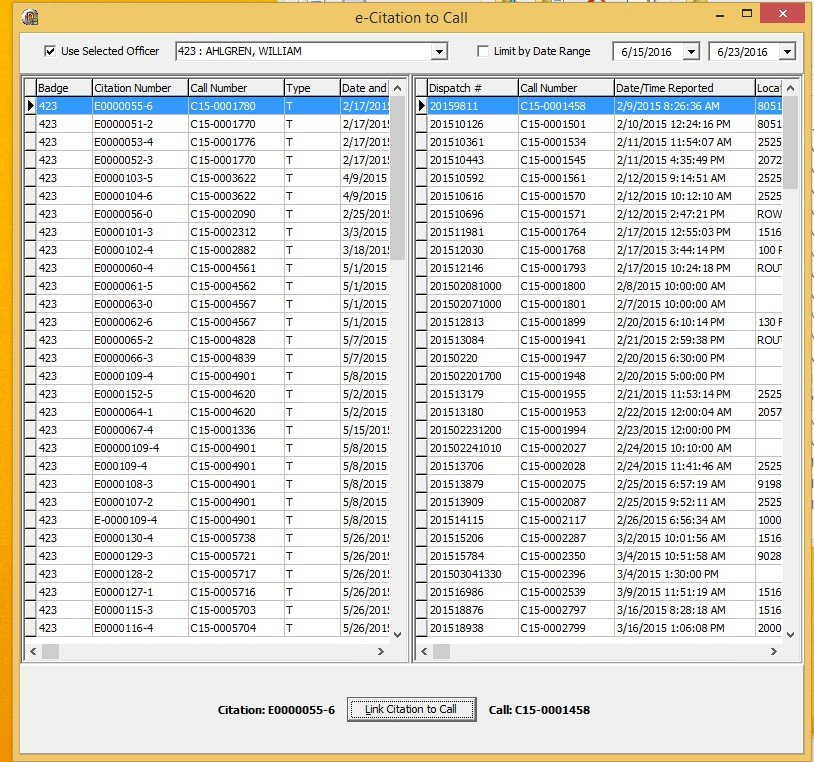
This tool is called “ecitetocall.exe” and it maps a citation to an existing call. Listed below, is a screen shot of the interface. The purpose of this tool is as a workaround until the next release, where the function to link citations to calls will be improved to transfer data from the citation to the call.
[](https://manula.s3.amazonaws.com/user/9801/img/cranberry-tool.jpg)[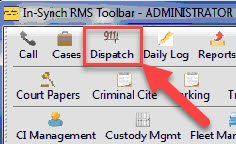](https://manula.s3.amazonaws.com/user/9801/img/cranberry-tool002.jpg)
**How to Use/Information About the Tool**
- This is a temporary solution, not a long term fix. In the next release after 4.8.1 the link process in Traffic Citations will port data from the citation to the call.
- This tool has been placed on Cranberry’s toolbar under the dispatch icon. The in-synch.ini path was changed for the dispatch module to point at this EXE.
- The initial screen by default shows:
- Calls and citations for the badge number of the active user launching the tool.
- Shows call / citations for the last week.
- The screen can be manipulated to show:
- Calls and citations for other users. When doing so ensure to tick “Use Selected Officer”.
- Custom date rangers. When doing so, please ensure “Limit by Date Range” is ticked.
- Other useful miscellaneous information:
- Calls linked to a citation clear from the grid. Only calls not linked to a citation show.
- This tool is only capable of linking one citation to a call at a time.
- Data Ported from Citation to Call
- Defendant / Vehicle
Was this article helpful?
That’s Great!
Thank you for your feedback
Sorry! We couldn't be helpful
Thank you for your feedback
Let us know how can we improve this article! \*
Feedback sent
We appreciate your effort and will try to fix the article
**X**
- [Release Notes](https://kb.arms.com/in-synch/release-notes?hsLang=en#main-content)
- [Version 4.8](https://kb.arms.com/in-synch/release-notes?hsLang=en#version-4-8)
- [Knowledge base3](https://kb.arms.com/in-synch/knowledge-base3?hsLang=en#main-content)
- [How To](https://kb.arms.com/in-synch/knowledge-base3?hsLang=en#how-to)
- [Knowledge base2](https://kb.arms.com/in-synch/knowledge-base2?hsLang=en#main-content)
- [Modules](https://kb.arms.com/in-synch/knowledge-base2?hsLang=en#modules)
- [Knowledge base1](https://kb.arms.com/in-synch/knowledge-base1?hsLang=en#main-content)
- [State Reporting](https://kb.arms.com/in-synch/knowledge-base1?hsLang=en#state-reporting)
- [Internal Wiki](https://kb.arms.com/in-synch/knowledge-base1?hsLang=en#internal-wiki)
- [State Specific Modules](https://kb.arms.com/in-synch/knowledge-base1?hsLang=en#state-specific-modules)
- [Release Notes](https://kb.arms.com/in-synch/knowledge-base1?hsLang=en#release-notes)
- [In-Synch RMS QuickStart Video Series](https://kb.arms.com/in-synch/knowledge-base1?hsLang=en#in-synch-rms-quickstart-video-series)
- [Error Messages](https://kb.arms.com/in-synch/knowledge-base1?hsLang=en#error-messages)
- [Knowledge base](https://kb.arms.com/in-synch/knowledge-base?hsLang=en#main-content)
- [Interfaces](https://kb.arms.com/in-synch/knowledge-base?hsLang=en#interfaces)
[](http://arms.com)
[mailto:email@email.com](mailto:email@email.com)
Copyright © 2026, End2End Public Safety