---
title: Court Solutions
description: In-Synch
---
[Skip to content](https://kb.arms.com/in-synch/court-solutions#main-content)
English
Show submenu for translations

Open main navigation
Close main navigation
- English
Show submenu for translations
- Contact us
Contact us
How can we help you?
- There are no suggestions because the search field is empty.
1. [In-Synch](https://kb.arms.com/in-synch?hsLang=en)
2. [Knowledge base1](https://kb.arms.com/in-synch/knowledge-base1?hsLang=en)
3. [Internal Wiki](https://kb.arms.com/in-synch/knowledge-base1?hsLang=en#internal-wiki)
# Court Solutions
No recent searches
Popular Articles

Sorry! nothing found for
### Court Solutions
Created by Russ Hartle, Modified on Tue, 15 Apr, 2025 at 9:53 AM by Russ Hartle
### What is Court Solutions?
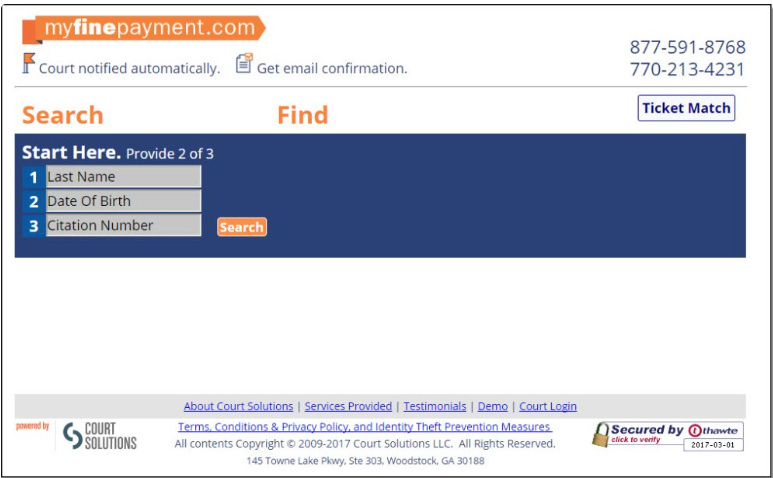
Court Solutions offers the service of traffic citation billing, and payment collecting for Police Agencies.
### In-Synch Working with Court Solutions
We have an application that we will place on our customer’s server. This application will be launched using a Window’s scheduled task. At this point the application will wait one minute and then look into the RMS database and extract any newly entered citations. These citations will be assembled into one CSV file and then sent via ftp to the Court Solutions server. Once the file is sent to the server our application closes.
### Setup
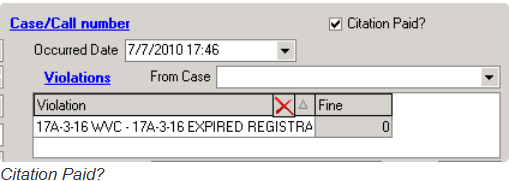
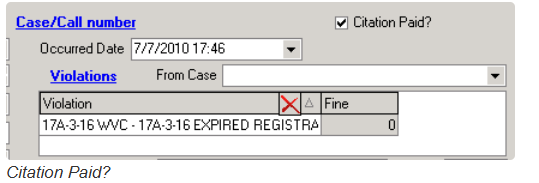
1\. Before any work begins please ensure the customer is aware that citations marked as paid (illustrated below) might still report to Court Solutions. Our application only deems a citation paid if the outstanding balance is 0 inside traffic citation payments. Whether or not the citation marked is marked as paid has no influence.
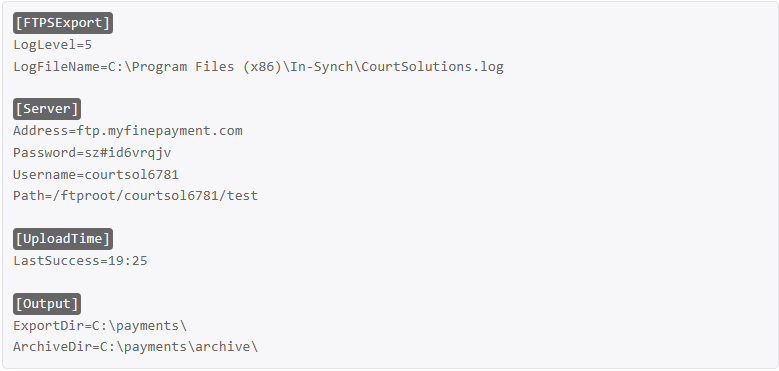
2\. Assuming court solutions install has been delegated down you will need to request the Court Solutions ftp username, password, and path. Whoever delegates this down should provide it I assume.
3\. If Court Solutions has been previously installed at this customer site please ensure that “UsesCourtSolutions” agency preference is set to false in the database.
4\. You will want to insert the following information into the in-synch.ini substituting in the agency specific settings obtained in step 2.
5\. Make sure the latest QA approved FTPSexport.exe is in the in-synch directory.
6\. Setup a windows scheduled task to launch the file once a day.
7\. Run your scheduled task so that FTPSexport launches. Let the application process all current citations. When the application has completed processing it will close. This process will take roughly five minutes.
### Errors/Questions
1\. Certain actions like data merging can cause person records to get marked with two current home addresses. When this happens the ftpsexport application will error with the following error. This is a safety precaution because court solutions need a valid billable address. Therefore, you need to locate the person record and request the correct address from the customer.
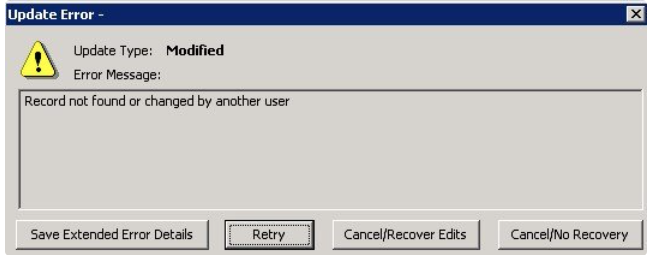
- To correct this issue simply click save extended error details. Open the error details and locate the defendant within this citation. Within the error details there will be a section titled “Error Packet” inside this section the name of the defendant will be listed. Once you locate the defendant open his/her person record and ask the customer which address is the current address and select that address as the home address.
2\. As mentioned in the instructions for setting this up. Traffic citations marked as paid (illustrated below) might still report to Court Solutions. Our application only deems a citation paid if the outstanding balance is 0 inside traffic citation payments. Whether or not the citation marked is marked as paid has no influence.
Was this article helpful?
That’s Great!
Thank you for your feedback
Sorry! We couldn't be helpful
Thank you for your feedback
Let us know how can we improve this article! \*
Feedback sent
We appreciate your effort and will try to fix the article
**X**
- [Release Notes](https://kb.arms.com/in-synch/release-notes?hsLang=en#main-content)
- [Version 4.8](https://kb.arms.com/in-synch/release-notes?hsLang=en#version-4-8)
- [Knowledge base3](https://kb.arms.com/in-synch/knowledge-base3?hsLang=en#main-content)
- [How To](https://kb.arms.com/in-synch/knowledge-base3?hsLang=en#how-to)
- [Knowledge base2](https://kb.arms.com/in-synch/knowledge-base2?hsLang=en#main-content)
- [Modules](https://kb.arms.com/in-synch/knowledge-base2?hsLang=en#modules)
- [Knowledge base1](https://kb.arms.com/in-synch/knowledge-base1?hsLang=en#main-content)
- [State Reporting](https://kb.arms.com/in-synch/knowledge-base1?hsLang=en#state-reporting)
- [Internal Wiki](https://kb.arms.com/in-synch/knowledge-base1?hsLang=en#internal-wiki)
- [State Specific Modules](https://kb.arms.com/in-synch/knowledge-base1?hsLang=en#state-specific-modules)
- [Release Notes](https://kb.arms.com/in-synch/knowledge-base1?hsLang=en#release-notes)
- [In-Synch RMS QuickStart Video Series](https://kb.arms.com/in-synch/knowledge-base1?hsLang=en#in-synch-rms-quickstart-video-series)
- [Error Messages](https://kb.arms.com/in-synch/knowledge-base1?hsLang=en#error-messages)
- [Knowledge base](https://kb.arms.com/in-synch/knowledge-base?hsLang=en#main-content)
- [Interfaces](https://kb.arms.com/in-synch/knowledge-base?hsLang=en#interfaces)
[](http://arms.com)
[mailto:email@email.com](mailto:email@email.com)
Copyright © 2026, End2End Public Safety