---
title: Detainee Information
description: In-Synch
---
[Skip to content](https://kb.arms.com/in-synch/detainee-information#main-content)
English
Show submenu for translations

Open main navigation
Close main navigation
- English
Show submenu for translations
- Contact us
Contact us
How can we help you?
- There are no suggestions because the search field is empty.
1. [In-Synch](https://kb.arms.com/in-synch?hsLang=en)
2. [Knowledge base2](https://kb.arms.com/in-synch/knowledge-base2?hsLang=en)
3. [Modules](https://kb.arms.com/in-synch/knowledge-base2?hsLang=en#modules)
# Detainee Information
No recent searches
Popular Articles

Sorry! nothing found for
### Detainee Information
Created by Russ Hartle, Modified on Thu, 3 Apr, 2025 at 3:07 PM by Russ Hartle
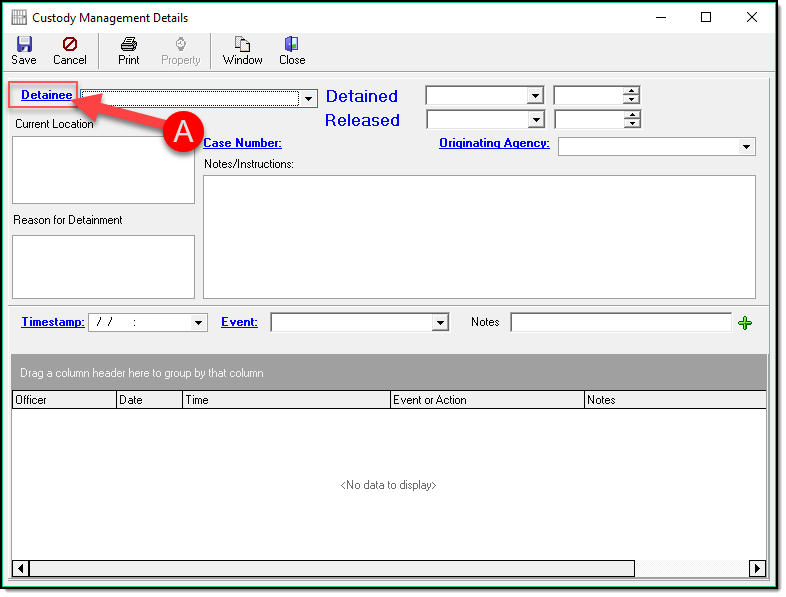
Click the blue hyperlink ‘Detainee’ (A) to add a person as a detainee. You can follow the steps in our [Searching and Entering a Person](https://www.manula.com/manuals/in-synch-systems/in-synch-rms-manual/1/en/topic/searching-and-entering-a-person) section if you are not familiar with searching and choosing a person.
[](https://manula.s3.amazonaws.com/user/9801/img/custody012.png)
### Detainee Dates and Times
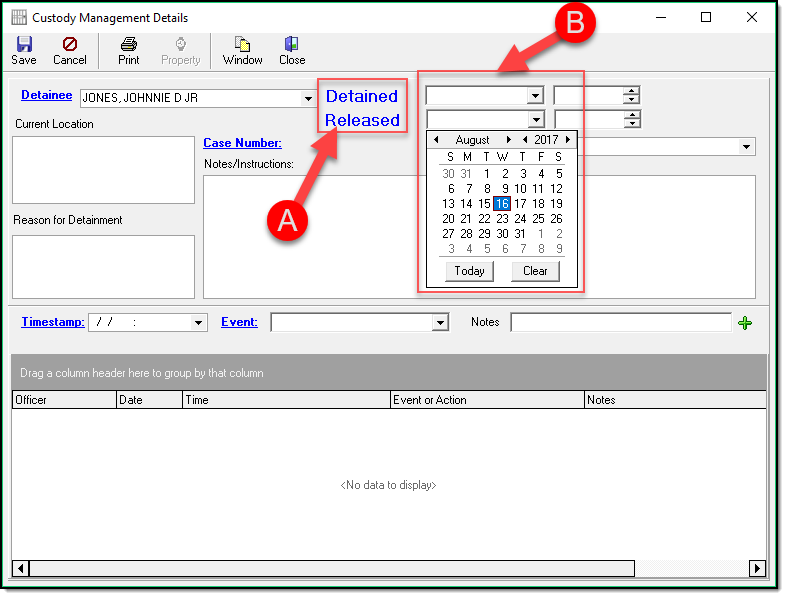
You will now need to enter the relevant Dates and Times for your detainee.
By clicking blue words Detained or Released (A) will enter the current date and time in the box. If you need to enter a different date you can use the drop-down box (B) beside either that will provide a calendar you can choose the appropriate date from.
[](https://manula.s3.amazonaws.com/user/9801/img/custody013.png)
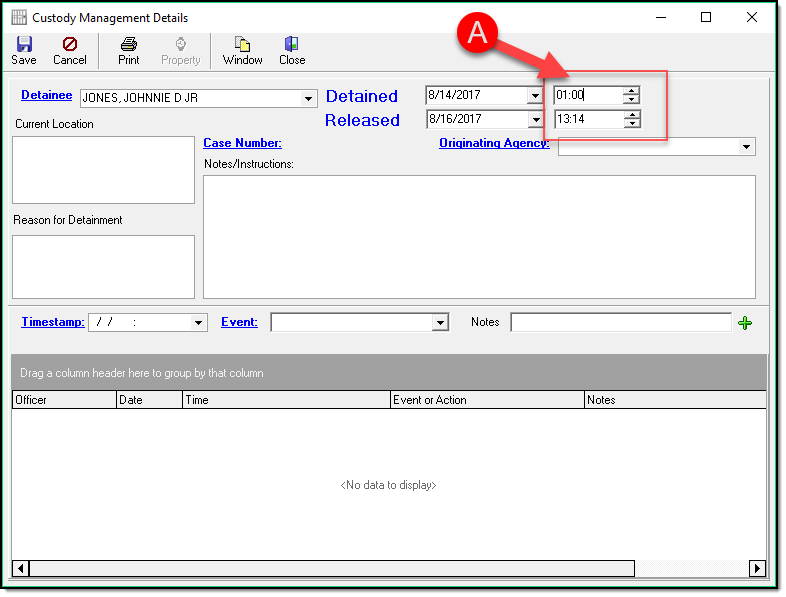
The default Time is your current system clock time but can be edited by typing whatever time you want in the boxes (A) once you select your date.
[](https://manula.s3.amazonaws.com/user/9801/img/custody014.png)
Was this article helpful?
That’s Great!
Thank you for your feedback
Sorry! We couldn't be helpful
Thank you for your feedback
Let us know how can we improve this article! \*
Feedback sent
We appreciate your effort and will try to fix the article
**X**
- [Release Notes](https://kb.arms.com/in-synch/release-notes?hsLang=en#main-content)
- [Version 4.8](https://kb.arms.com/in-synch/release-notes?hsLang=en#version-4-8)
- [Knowledge base3](https://kb.arms.com/in-synch/knowledge-base3?hsLang=en#main-content)
- [How To](https://kb.arms.com/in-synch/knowledge-base3?hsLang=en#how-to)
- [Knowledge base2](https://kb.arms.com/in-synch/knowledge-base2?hsLang=en#main-content)
- [Modules](https://kb.arms.com/in-synch/knowledge-base2?hsLang=en#modules)
- [Knowledge base1](https://kb.arms.com/in-synch/knowledge-base1?hsLang=en#main-content)
- [State Reporting](https://kb.arms.com/in-synch/knowledge-base1?hsLang=en#state-reporting)
- [Internal Wiki](https://kb.arms.com/in-synch/knowledge-base1?hsLang=en#internal-wiki)
- [State Specific Modules](https://kb.arms.com/in-synch/knowledge-base1?hsLang=en#state-specific-modules)
- [Release Notes](https://kb.arms.com/in-synch/knowledge-base1?hsLang=en#release-notes)
- [In-Synch RMS QuickStart Video Series](https://kb.arms.com/in-synch/knowledge-base1?hsLang=en#in-synch-rms-quickstart-video-series)
- [Error Messages](https://kb.arms.com/in-synch/knowledge-base1?hsLang=en#error-messages)
- [Knowledge base](https://kb.arms.com/in-synch/knowledge-base?hsLang=en#main-content)
- [Interfaces](https://kb.arms.com/in-synch/knowledge-base?hsLang=en#interfaces)
[](http://arms.com)
[mailto:email@email.com](mailto:email@email.com)
Copyright © 2026, End2End Public Safety