---
title: Entering A New Warrant
description: In-Synch
---
[Skip to content](https://kb.arms.com/in-synch/entering-a-new-warrant#main-content)
English
Show submenu for translations

Open main navigation
Close main navigation
- English
Show submenu for translations
- Contact us
Contact us
How can we help you?
- There are no suggestions because the search field is empty.
1. [In-Synch](https://kb.arms.com/in-synch?hsLang=en)
2. [Knowledge base2](https://kb.arms.com/in-synch/knowledge-base2?hsLang=en)
3. [Modules](https://kb.arms.com/in-synch/knowledge-base2?hsLang=en#modules)
# Entering A New Warrant
No recent searches
Popular Articles

Sorry! nothing found for
### Entering A New Warrant
Created by Russ Hartle, Modified on Tue, 24 Jun, 2025 at 2:36 PM by Russ Hartle
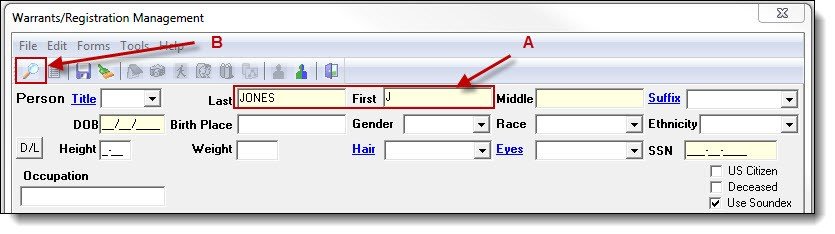
1\. Enter part of the person’s last name, first name or both (A), and then click the “Search” button (B).
[](https://manula.s3.amazonaws.com/user/9801/img/warrants-registrations-002.jpg)
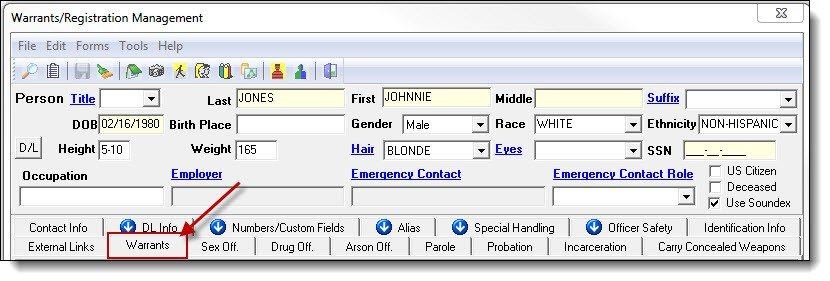
2\. Once a person record has been created or chosen, click the Warrants tab.
[](https://manula.s3.amazonaws.com/user/9801/img/warrants-registrations-003.jpg)
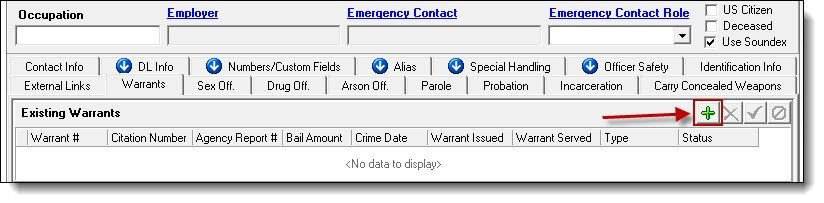
3\. Click the “Add” button to create a new warrant record.
[](https://manula.s3.amazonaws.com/user/9801/img/warrants-registrations-004.jpg)
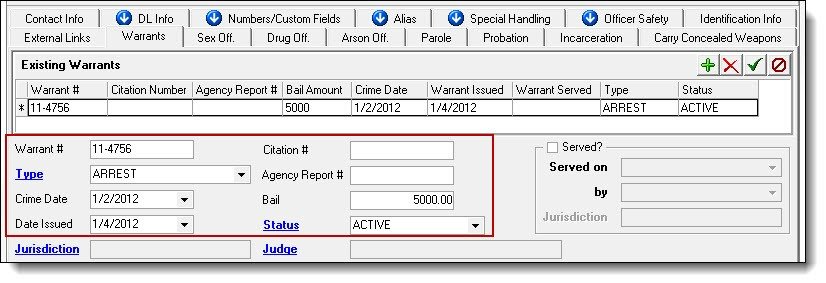
4\. Enter any known information into the following fields: Warrant Number, Type, Crime Date, Date Issued, Citation #, Agency Report #, Bail, and Status.
[](https://manula.s3.amazonaws.com/user/9801/img/warrants-registrations-005.jpg)*!***Did You Know?**
- Warrant Number, Type, Date Issued, and Status are required field; the other fields can be left blank if your agency does not track that information.
- Warrant Type and Status are pick lists that can be edited by members of the Administrators security group to match an agency’s terminology
Was this article helpful?
That’s Great!
Thank you for your feedback
Sorry! We couldn't be helpful
Thank you for your feedback
Let us know how can we improve this article! \*
Feedback sent
We appreciate your effort and will try to fix the article
**X**
- [Release Notes](https://kb.arms.com/in-synch/release-notes?hsLang=en#main-content)
- [Version 4.8](https://kb.arms.com/in-synch/release-notes?hsLang=en#version-4-8)
- [Knowledge base3](https://kb.arms.com/in-synch/knowledge-base3?hsLang=en#main-content)
- [How To](https://kb.arms.com/in-synch/knowledge-base3?hsLang=en#how-to)
- [Knowledge base2](https://kb.arms.com/in-synch/knowledge-base2?hsLang=en#main-content)
- [Modules](https://kb.arms.com/in-synch/knowledge-base2?hsLang=en#modules)
- [Knowledge base1](https://kb.arms.com/in-synch/knowledge-base1?hsLang=en#main-content)
- [State Reporting](https://kb.arms.com/in-synch/knowledge-base1?hsLang=en#state-reporting)
- [Internal Wiki](https://kb.arms.com/in-synch/knowledge-base1?hsLang=en#internal-wiki)
- [State Specific Modules](https://kb.arms.com/in-synch/knowledge-base1?hsLang=en#state-specific-modules)
- [Release Notes](https://kb.arms.com/in-synch/knowledge-base1?hsLang=en#release-notes)
- [In-Synch RMS QuickStart Video Series](https://kb.arms.com/in-synch/knowledge-base1?hsLang=en#in-synch-rms-quickstart-video-series)
- [Error Messages](https://kb.arms.com/in-synch/knowledge-base1?hsLang=en#error-messages)
- [Knowledge base](https://kb.arms.com/in-synch/knowledge-base?hsLang=en#main-content)
- [Interfaces](https://kb.arms.com/in-synch/knowledge-base?hsLang=en#interfaces)
[](http://arms.com)
[mailto:email@email.com](mailto:email@email.com)
Copyright © 2026, End2End Public Safety