---
title: Saving Queries
description: In-Synch
---
[Skip to content](https://kb.arms.com/in-synch/saving-queries#main-content)
English
Show submenu for translations

Open main navigation
Close main navigation
- English
Show submenu for translations
- Contact us
Contact us
How can we help you?
- There are no suggestions because the search field is empty.
1. [In-Synch](https://kb.arms.com/in-synch?hsLang=en)
2. [Knowledge base2](https://kb.arms.com/in-synch/knowledge-base2?hsLang=en)
3. [Modules](https://kb.arms.com/in-synch/knowledge-base2?hsLang=en#modules)
# Saving Queries
No recent searches
Popular Articles

Sorry! nothing found for
### Saving Queries
Created by Russ Hartle, Modified on Fri, 20 Jun, 2025 at 2:41 PM by Russ Hartle
You can easily save queries for future use by yourself or by other people in your department.
To save a query:
1. Create the new Query as explained in the [Creating a New Query](https://www.manula.com/manuals/in-synch-systems/in-synch-rms-manual/1/en/topic/creating-a-new-query) section.
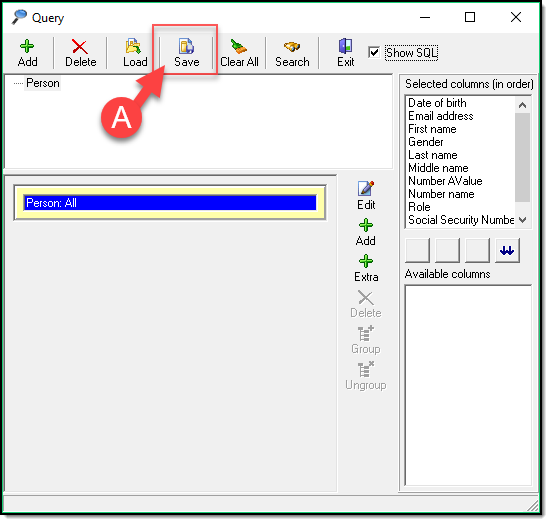
2. Click Save (A)
[](https://manula.s3.amazonaws.com/user/9801/img/query017.png)
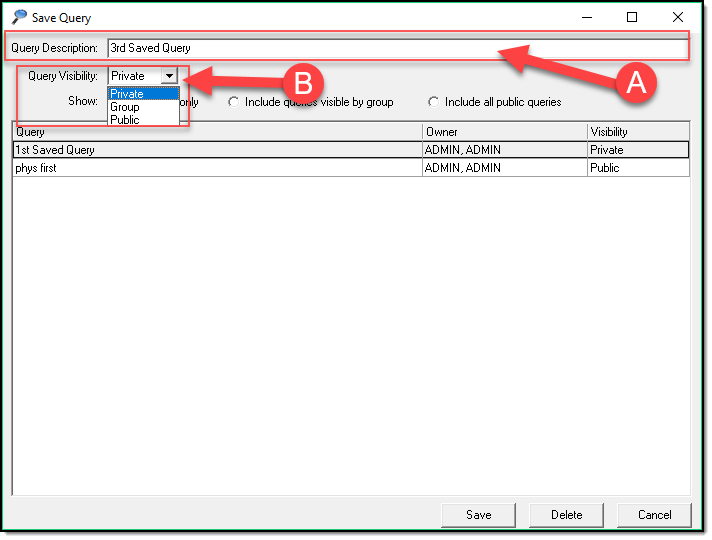
3. Enter a Query Description (A), Set the Query Visibility (B) to determine who can see your Saved Query.
[](https://manula.s3.amazonaws.com/user/9801/img/query018_v1.png)
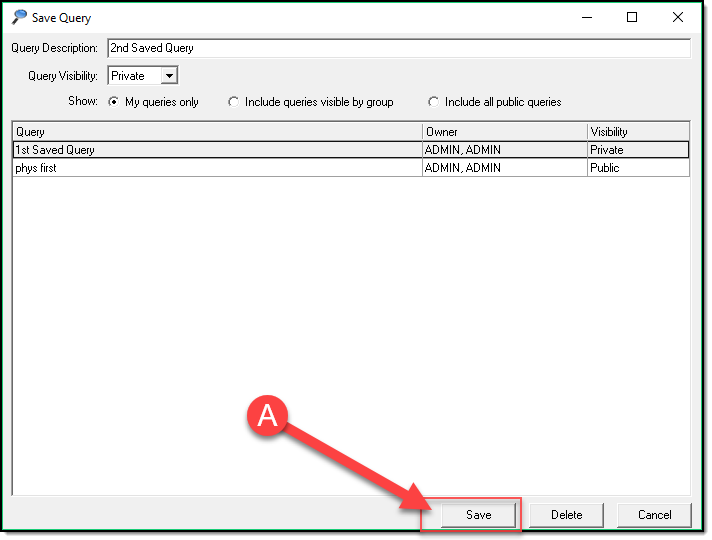
4. Click Save (A)
[](https://manula.s3.amazonaws.com/user/9801/img/query019.png)
*\****Tips:**
Query Visibility. Private queries are only viewable by yourself. Group queries are viewable by your group. Public queries are viewable by everyone.
Was this article helpful?
That’s Great!
Thank you for your feedback
Sorry! We couldn't be helpful
Thank you for your feedback
Let us know how can we improve this article! \*
Feedback sent
We appreciate your effort and will try to fix the article
**X**
- [Release Notes](https://kb.arms.com/in-synch/release-notes?hsLang=en#main-content)
- [Version 4.8](https://kb.arms.com/in-synch/release-notes?hsLang=en#version-4-8)
- [Knowledge base3](https://kb.arms.com/in-synch/knowledge-base3?hsLang=en#main-content)
- [How To](https://kb.arms.com/in-synch/knowledge-base3?hsLang=en#how-to)
- [Knowledge base2](https://kb.arms.com/in-synch/knowledge-base2?hsLang=en#main-content)
- [Modules](https://kb.arms.com/in-synch/knowledge-base2?hsLang=en#modules)
- [Knowledge base1](https://kb.arms.com/in-synch/knowledge-base1?hsLang=en#main-content)
- [State Reporting](https://kb.arms.com/in-synch/knowledge-base1?hsLang=en#state-reporting)
- [Internal Wiki](https://kb.arms.com/in-synch/knowledge-base1?hsLang=en#internal-wiki)
- [State Specific Modules](https://kb.arms.com/in-synch/knowledge-base1?hsLang=en#state-specific-modules)
- [Release Notes](https://kb.arms.com/in-synch/knowledge-base1?hsLang=en#release-notes)
- [In-Synch RMS QuickStart Video Series](https://kb.arms.com/in-synch/knowledge-base1?hsLang=en#in-synch-rms-quickstart-video-series)
- [Error Messages](https://kb.arms.com/in-synch/knowledge-base1?hsLang=en#error-messages)
- [Knowledge base](https://kb.arms.com/in-synch/knowledge-base?hsLang=en#main-content)
- [Interfaces](https://kb.arms.com/in-synch/knowledge-base?hsLang=en#interfaces)
[](http://arms.com)
[mailto:email@email.com](mailto:email@email.com)
Copyright © 2026, End2End Public Safety