---
title: Working with Query Results
description: In-Synch
---
[Skip to content](https://kb.arms.com/in-synch/working-with-query-results#main-content)
English
Show submenu for translations

Open main navigation
Close main navigation
- English
Show submenu for translations
- Contact us
Contact us
How can we help you?
- There are no suggestions because the search field is empty.
1. [In-Synch](https://kb.arms.com/in-synch?hsLang=en)
2. [Knowledge base2](https://kb.arms.com/in-synch/knowledge-base2?hsLang=en)
3. [Modules](https://kb.arms.com/in-synch/knowledge-base2?hsLang=en#modules)
# Working with Query Results
No recent searches
Popular Articles

Sorry! nothing found for
### Working with Query Results
Created by Russ Hartle, Modified on Fri, 20 Jun, 2025 at 2:42 PM by Russ Hartle
Once you have performed a query of your data, you can jump to specific data records directly from the Query Tool.
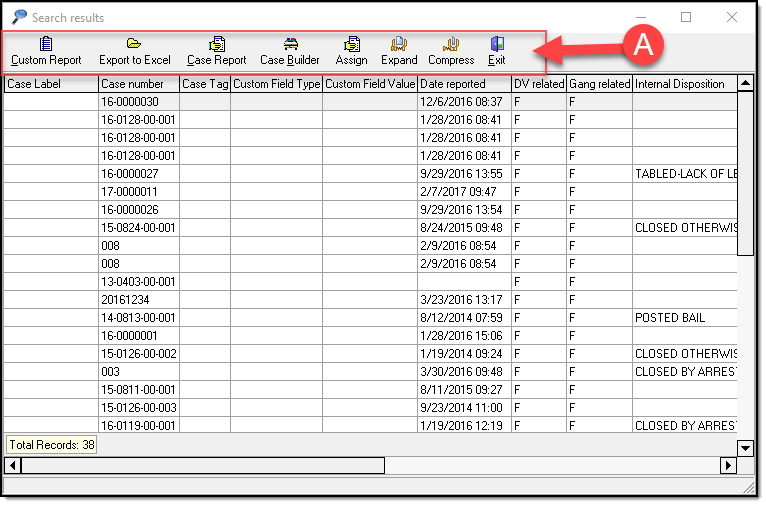
When you highlight a row of query results, buttons (A) will appear in the toolbar that gives you further option
[](https://manula.s3.amazonaws.com/user/9801/img/query026.png)
**For example:**
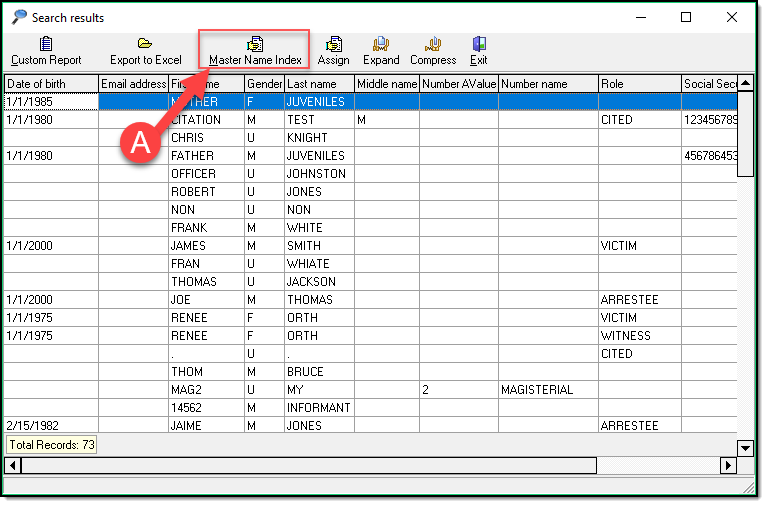
1. if Person records are returned, you can view the Master Name Index for the highlighted person.
[](https://manula.s3.amazonaws.com/user/9801/img/query024.png)
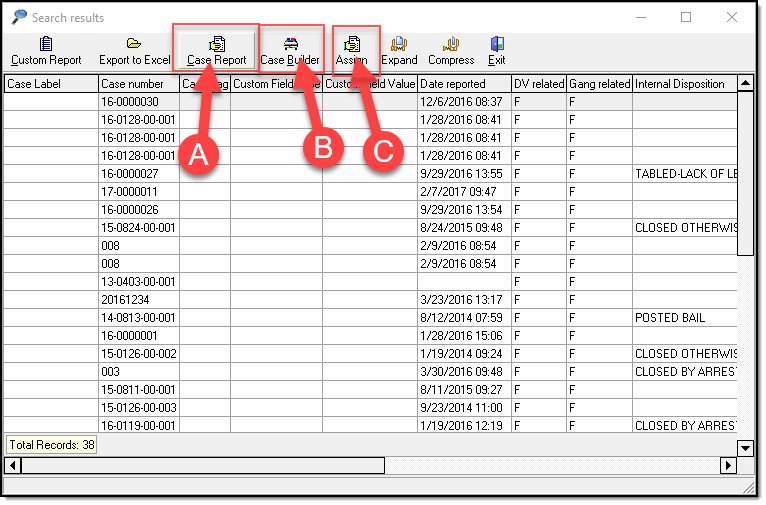
2. If Case data is returned, you can view the Case Report (A), open Case Builder (B), or Assign the case ( C ).
[](https://manula.s3.amazonaws.com/user/9801/img/query025.png)
*\****Tips:**
Various other options exist for people, organizations, vehicles, addresses, property, calls, and cases depending on your Query results.
*!***Did You Know?**
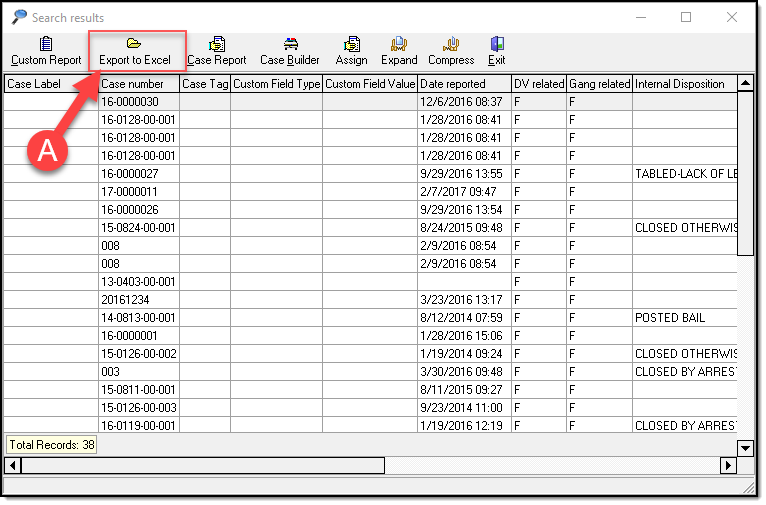
We have an **Export to Excel** button (A) that allows you to export the entire Query Grid Results to Excel and use Excel’s functionality to sort and filter as you wish. This function only works properly for single layer Queries. If you have a multiple layer Query please see the [Custom Report](https://www.manula.com/manuals/in-synch-systems/in-synch-rms-manual/1/en/topic/custom-reports) section.
[](https://manula.s3.amazonaws.com/user/9801/img/query027.png)
Was this article helpful?
That’s Great!
Thank you for your feedback
Sorry! We couldn't be helpful
Thank you for your feedback
Let us know how can we improve this article! \*
Feedback sent
We appreciate your effort and will try to fix the article
**X**
- [Release Notes](https://kb.arms.com/in-synch/release-notes?hsLang=en#main-content)
- [Version 4.8](https://kb.arms.com/in-synch/release-notes?hsLang=en#version-4-8)
- [Knowledge base3](https://kb.arms.com/in-synch/knowledge-base3?hsLang=en#main-content)
- [How To](https://kb.arms.com/in-synch/knowledge-base3?hsLang=en#how-to)
- [Knowledge base2](https://kb.arms.com/in-synch/knowledge-base2?hsLang=en#main-content)
- [Modules](https://kb.arms.com/in-synch/knowledge-base2?hsLang=en#modules)
- [Knowledge base1](https://kb.arms.com/in-synch/knowledge-base1?hsLang=en#main-content)
- [State Reporting](https://kb.arms.com/in-synch/knowledge-base1?hsLang=en#state-reporting)
- [Internal Wiki](https://kb.arms.com/in-synch/knowledge-base1?hsLang=en#internal-wiki)
- [State Specific Modules](https://kb.arms.com/in-synch/knowledge-base1?hsLang=en#state-specific-modules)
- [Release Notes](https://kb.arms.com/in-synch/knowledge-base1?hsLang=en#release-notes)
- [In-Synch RMS QuickStart Video Series](https://kb.arms.com/in-synch/knowledge-base1?hsLang=en#in-synch-rms-quickstart-video-series)
- [Error Messages](https://kb.arms.com/in-synch/knowledge-base1?hsLang=en#error-messages)
- [Knowledge base](https://kb.arms.com/in-synch/knowledge-base?hsLang=en#main-content)
- [Interfaces](https://kb.arms.com/in-synch/knowledge-base?hsLang=en#interfaces)
[](http://arms.com)
[mailto:email@email.com](mailto:email@email.com)
Copyright © 2026, End2End Public Safety