---
title: WV Criminal Complaint - Entering WV Specific Data
description: In-Synch
---
[Skip to content](https://kb.arms.com/in-synch/wv-criminal-complaint-entering-wv-specific-data#main-content)
English
Show submenu for translations

Open main navigation
Close main navigation
- English
Show submenu for translations
- Contact us
Contact us
How can we help you?
- There are no suggestions because the search field is empty.
1. [In-Synch](https://kb.arms.com/in-synch?hsLang=en)
2. [Knowledge base1](https://kb.arms.com/in-synch/knowledge-base1?hsLang=en)
3. [State Specific Modules](https://kb.arms.com/in-synch/knowledge-base1?hsLang=en#state-specific-modules)
# WV Criminal Complaint - Entering WV Specific Data
No recent searches
Popular Articles

Sorry! nothing found for
### WV Criminal Complaint - Entering WV Specific Data
Created by Russ Hartle, Modified on Mon, 31 Mar, 2025 at 10:29 AM by Russ Hartle
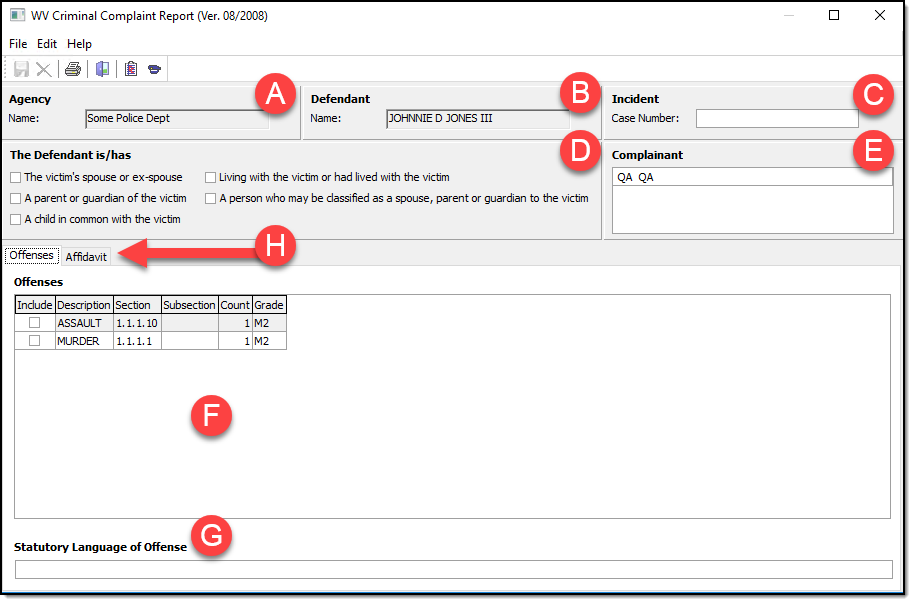
The “WV Criminal Complaint Report (Rer. 08/2008)” form illustrated below is used to enter data specific to the WV Criminal Complaint. Each section will be discussed in detail below the picture.
[](https://manula.s3.amazonaws.com/user/9801/img/wv-cc-wvspecific-data.png)
The following bullet points discuss each lettered section above.
- A – The field is grayed out to indicate it is for reference purposes only. This field shows the name of the arresting agency associated with the municipality.
- B – The field is grayed out to indicate it is for reference purposes only. This field shows the name of the defendant.
- C – This field is optional. It provides the ability to enter the magisterial case number if available, otherwise, leave the field blank.
- D – Select applicable relationship code(s) for the victim/defendant. If none of the codes are selected the software will automatically select “None of the above connections to the victim” on the WV Criminal Complaint.
- E – This field shows the complainant that will display on the Criminal Complaint. It is for reference purposes only.
- F – The offense(s) associated with the defendant show in this section. Select the single offense that will show on the Criminal Complaint by ticking the “Include” checkbox to the left of the offense description.
- G – This field is used to enter the statutory language of offense details.
- H – This tab possesses the facts section (discussed below) in a read-only view. It is a convenient method to quickly reference the facts.
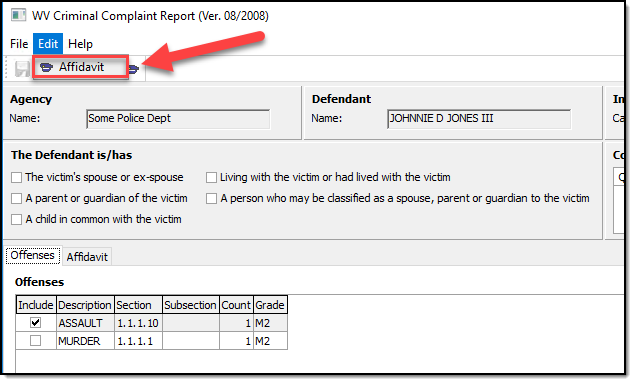
The final piece of data specific that needs to be entered is the facts for which the WV Criminal Complaint is based on. To enter the facts expand the “Edit” menu and click the “Affidavit” menu option. This will open a standard text editor that is common throughout the In-Synch RMS. There is no text limit associated with the facts section. Once completed please save and exit the text editor.
[](https://manula.s3.amazonaws.com/user/9801/img/wv-cc-affidavit-option-under-edits-menu.png)
Was this article helpful?
That’s Great!
Thank you for your feedback
Sorry! We couldn't be helpful
Thank you for your feedback
Let us know how can we improve this article! \*
Feedback sent
We appreciate your effort and will try to fix the article
**X**
- [Release Notes](https://kb.arms.com/in-synch/release-notes?hsLang=en#main-content)
- [Version 4.8](https://kb.arms.com/in-synch/release-notes?hsLang=en#version-4-8)
- [Knowledge base3](https://kb.arms.com/in-synch/knowledge-base3?hsLang=en#main-content)
- [How To](https://kb.arms.com/in-synch/knowledge-base3?hsLang=en#how-to)
- [Knowledge base2](https://kb.arms.com/in-synch/knowledge-base2?hsLang=en#main-content)
- [Modules](https://kb.arms.com/in-synch/knowledge-base2?hsLang=en#modules)
- [Knowledge base1](https://kb.arms.com/in-synch/knowledge-base1?hsLang=en#main-content)
- [State Reporting](https://kb.arms.com/in-synch/knowledge-base1?hsLang=en#state-reporting)
- [Internal Wiki](https://kb.arms.com/in-synch/knowledge-base1?hsLang=en#internal-wiki)
- [State Specific Modules](https://kb.arms.com/in-synch/knowledge-base1?hsLang=en#state-specific-modules)
- [Release Notes](https://kb.arms.com/in-synch/knowledge-base1?hsLang=en#release-notes)
- [In-Synch RMS QuickStart Video Series](https://kb.arms.com/in-synch/knowledge-base1?hsLang=en#in-synch-rms-quickstart-video-series)
- [Error Messages](https://kb.arms.com/in-synch/knowledge-base1?hsLang=en#error-messages)
- [Knowledge base](https://kb.arms.com/in-synch/knowledge-base?hsLang=en#main-content)
- [Interfaces](https://kb.arms.com/in-synch/knowledge-base?hsLang=en#interfaces)
[](http://arms.com)
[mailto:email@email.com](mailto:email@email.com)
Copyright © 2026, End2End Public Safety