---
title: Batch Receiving
description: Batch Receiving
---
[Skip to content](https://kb.arms.com/teleosoft/batch-receiving#main-content)
English
Show submenu for translations

Open main navigation
Close main navigation
- English
Show submenu for translations
- [Customer Portal](https://helpdesk.arms.com/tickets)
[Customer Portal](https://helpdesk.arms.com/tickets?hsLang=en)
How can we help you?
- There are no suggestions because the search field is empty.
1. [Teleosoft](https://kb.arms.com/teleosoft?hsLang=en)
2. [Courts](https://kb.arms.com/teleosoft/courts?hsLang=en)
3. [Civil Court](https://kb.arms.com/teleosoft/courts?hsLang=en#civil-court)
# Batch Receiving
[Click here to download the PDF](https://kb.arms.com/hubfs/CountySuite%20Courts%20-%20Batch%20Receiving.pdf?hsLang=en)

**Batch Receiving**
**Batch Receiving**
Batch Receiving allows the user to add multiple filings at the same time from the same check/payment type. This feature is typically used if an attorney is filing multiple initial case filings or subsequent filings and has one check. This feature could also be used for entering a check from the State for criminal judgment filings.
Not all filing categories that are on the receiving page will appear on the batch receiving page. To get the needed initial and subsequent filing categories added, please contact Support so they can configure this.
**How to Use Batch Receiving**
On the Receiving page, click Batch Receipt.

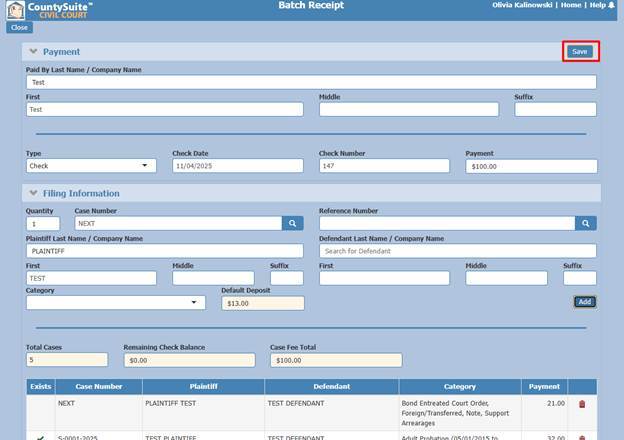
On the Batch Receipt page, input payment information – the name of the person or company that is paying and deposit information (type, check number, check total). The payment amount will be distributed between all received filings.
The Paid By contact will be shown as the filed by on each of the case filing ledgers.
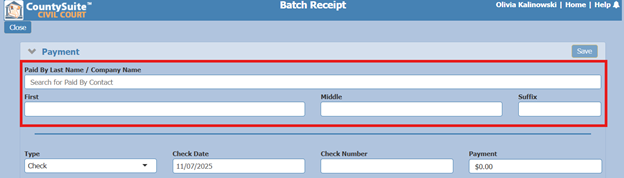
When you type in the last name/company name, a dropdown will appear so that you can easily select the contact if they already exist in the application. (The user can type: last name, first name to narrow down the search).
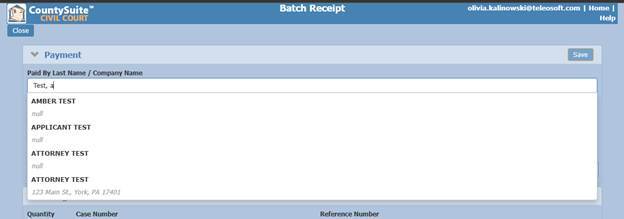
If the contact does not exist, click back onto the page to close the search dropdown, and enter the payor’s name to create a new contact.
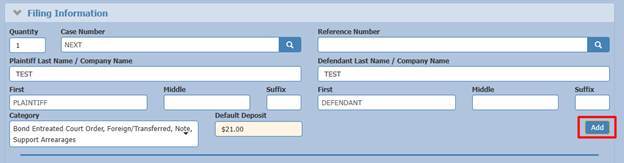
When adding a new case, leave the Case Number as NEXT and select the initial filing category. One Plaintiff and one Defendant can be added, but no other contacts can be input on this page (additional contacts will need to be added later in the case).
Once all the information is input, click Add.
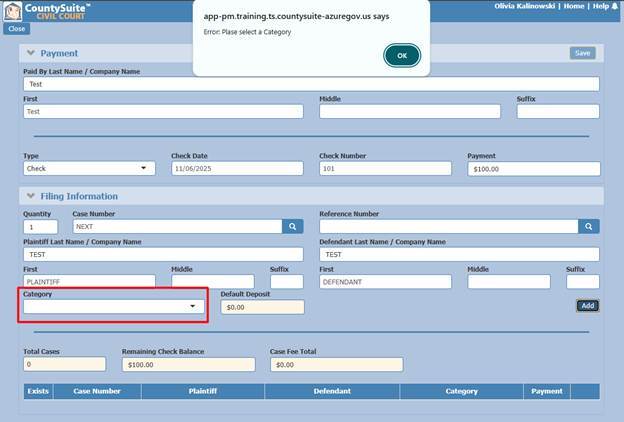
If the filing category is not selected and Add is clicked, an error message will appear at the top of the page to select a filing category in order to proceed.
When adding subsequent filings, the **exact** case number needs to be typed. Once the case number is entered, click the magnifying glass. An existing case is only recognized if the check mark appears near the Case Number section.
Once the check mark appears, the primary plaintiff and defendant that are already on the case will populate.
Select the subsequent filing and click Add.
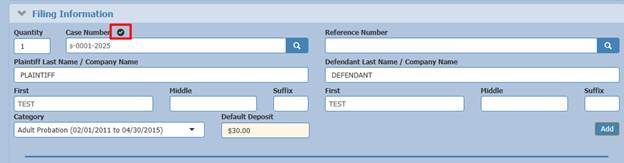
Another option to add subsequent filings is to use the Reference Number that is on the case.
The Reference Number field will function just like the Case Number field - **exact** number, checkmark. (This is useful for entering a bulk check from the State for criminal judgment filings. The user can look up the CPCMS case number which is in the Reference Number field.)
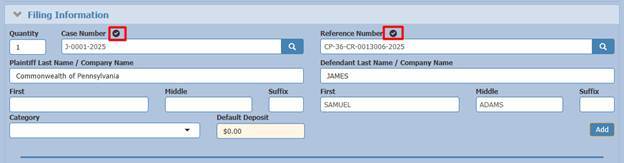
Once the Reference Number is entered, click the magnifying glass. An existing case is only recognized if the check mark appears near the Reference Number section and the Case Number section.
Once the check mark is visible select the subsequent filing category and click Add.
Each time a filing is added, the bottom of the page will show the case number, primary plaintiff, primary defendant, filing category, and total payment of each filing.
There is a calculation visible of how many cases are received so far, how much money is remaining and still needs to be distributed, as well as how much money the total case fees are.
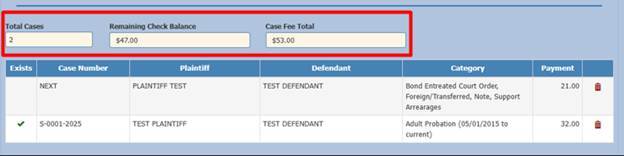
The check needs to be completely distributed. The save button to finish receiving all the filings at the top of the page is grayed out until all of the money is distributed between each filing.
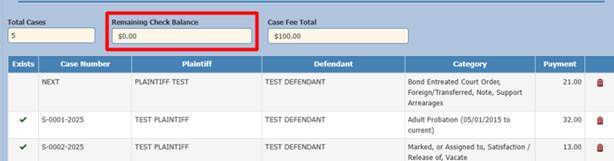
Once the check has been completely distributed and the remaining check balance equals $0, click Save at the top right corner of the Batch Receipt page. This will apply the deposit and associated costs onto each case into separate case filing ledgers. For initial filings, new cases will be created as well.
After clicking save, a receipt will open in a new tab that will show all the filings received.
The receipt generated will show the cases in ascending Case Number order.
The money will be split between each case and will have their own case filing ledger for that filing on their respective cases.
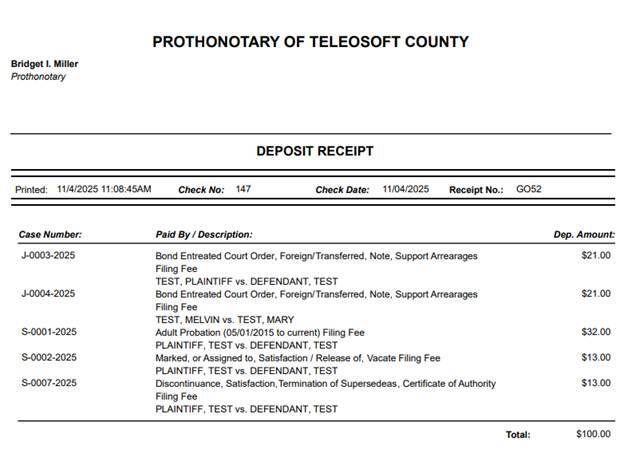
The Paid By contact will be shown as the filed by on each of the case filing ledgers.

**Batch Receiving Cheat Sheet**
- Home -\> Receiving Page -\> Batch Receipt
- Add Payment Information (Paid By, Deposit Type, Check Date, Check Number, Deposit Total)
- Initial Filing -\> Leave Case Number as NEXT
- Input one plaintiff and one defendant
- Select initial filing category
- Click Add
- Subsequent Filing -\> Type exact Case Number -\> click magnifying glass
- Alternatively, type Reference Number -\> click magnifying glass
- If the case number or reference number exists, check mark will appear next to the section name
- Primary Plaintiff and Defendant name will populate
- Select subsequent filing category
- Click Add
- Repeat process until all money is distributed.
- Once Remaining Check Balance is completely distributed and says $0.00
- Click Save at the top right corner of the page
- [Teleosoft Documents](https://kb.arms.com/teleosoft/teleosoft-documents?hsLang=en#main-content)
- [Test](https://kb.arms.com/teleosoft/teleosoft-documents?hsLang=en#test)
- [Courts](https://kb.arms.com/teleosoft/courts?hsLang=en#main-content)
- [Civil Court](https://kb.arms.com/teleosoft/courts?hsLang=en#civil-court)
- [CA Sheriff](https://kb.arms.com/teleosoft/ca-sheriff?hsLang=en)
[mailto:support@arms.com](mailto:support@arms.com)
Copyright © 2026, End2End Public Safety