---
title: "How To User Guide: User-Defined Accounts"
description: "How To User Guide: User-Defined Accounts"
---
[Skip to content](https://kb.arms.com/teleosoft/how-to-user-guide-user-defined-accounts#main-content)
English
Show submenu for translations

Open main navigation
Close main navigation
- English
Show submenu for translations
- [Customer Portal](https://helpdesk.arms.com/tickets)
[Customer Portal](https://helpdesk.arms.com/tickets?hsLang=en)
How can we help you?
- There are no suggestions because the search field is empty.
1. [Teleosoft](https://kb.arms.com/teleosoft?hsLang=en)
2. [Teleosoft Documents](https://kb.arms.com/teleosoft/teleosoft-documents?hsLang=en)
# How To User Guide: User-Defined Accounts
[Click here to download the PDF](https://kb.arms.com/hubfs/CountySuite%20CivilCourt%20-%20How%20To%20-%20User-Defined%20Accounts.pdf?hsLang=en)

**How To User Guide: User-Defined Accounts**
User-Defined Accounts
When a filing is brought in as a User-Defined Account on the Receiving page, the system creates a specific Account for that filling which includes its own Accounts, Deposits and Reconciliation views.[\[1\]](https://kb.arms.com/teleosoft/how-to-user-guide-user-defined-accounts#_ftn1) This is different than the usual scenario where all filings—regardless of type—are tied to the main Escrow Account, Deposits, and Reconciliation views.
For example, York Prothy is configured for the following scenario:[\[2\]](https://kb.arms.com/teleosoft/how-to-user-guide-user-defined-accounts#_ftn2)
- A judge orders that an interest-bearing Escrow Account be created for a certain case (of whatever filing type).
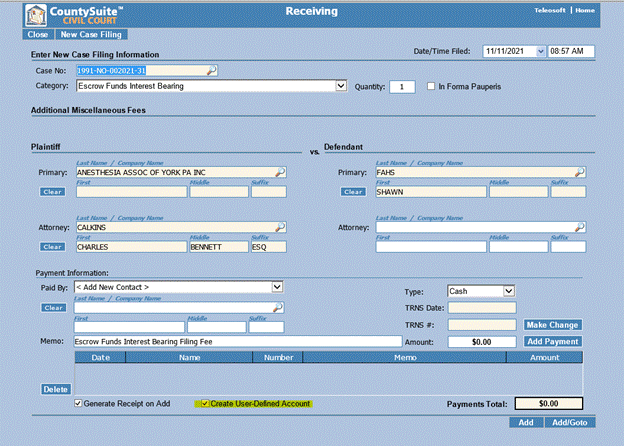
- We created a subsequent filing (Request) called “Escrow Funds Interest Bearing” that is available in the Category dropdown.
- We tied that filing type to the Rule that controls which filing types create UDAs (the rule name is “Create User Defined Account Names”)
- As you can see on the Receiving page, a checkbox that says “Create User-Defined Account” is automatically selected
- Note the gray “User-Defined Account” banner to alert the user that this is a User-Defined filing
- As you can see, the Account drop-down, rather than displaying Escrow shows the specific case UDA. However, the Escrow account and every other UDA is available in the dropdown to be selected if desired.
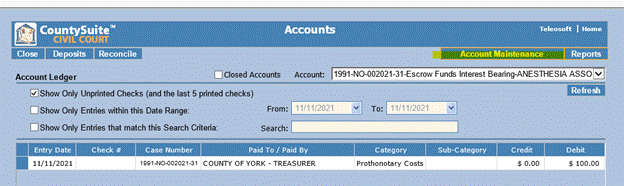
- Note also that the cost from the ledger has been transferred to Accounts and that it’s the only cost because it’s the only cost on the ledger.
- Also, any user with the ability to view Accounts (by permission) can view the User-Defined Accounts.
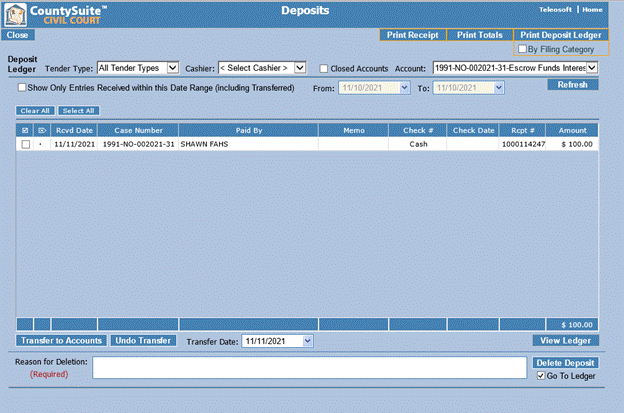
- Again, the only deposit tied to the account is available for review on the Deposits page.
- And below, you can see that the Reconciliation is blank since the Deposit has not been transferred and the cost has not yet been paid out (no check number).
- User-Defined Account Name Maintenance page allows you to change the name of the Account and/or Close it (this is the only page where you can close UDAs).
- To access the Account Maintenance page, a user must have the “User Def Account Maintenance” permission
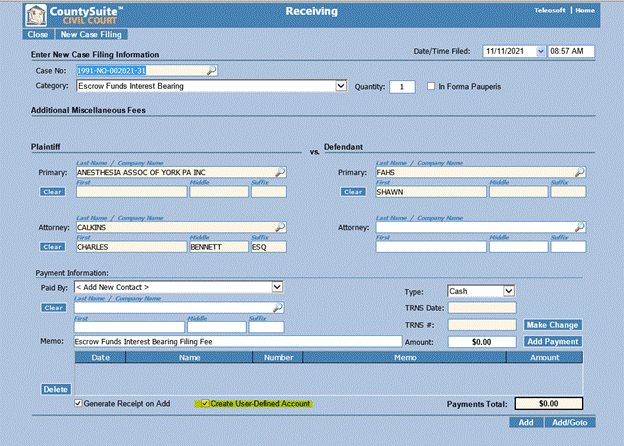
Once the filing is created, all money brought in on that specific filing (not case) will be directed to and managed with unique Accounts, Deposits, and Reconciliation views. That money will be separate from the Escrow Account even if there are other filings on the same case tied to the normal Escrow Account.
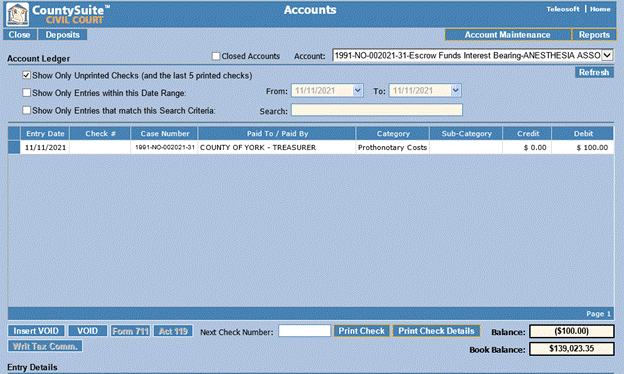
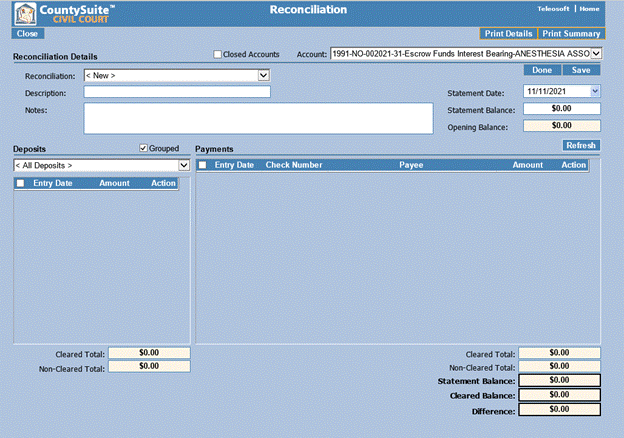
Finally, note the Account Maintenance button on the Accounts page.
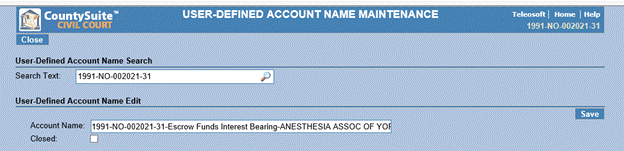
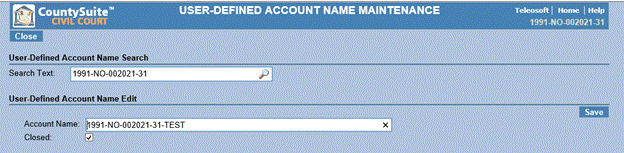
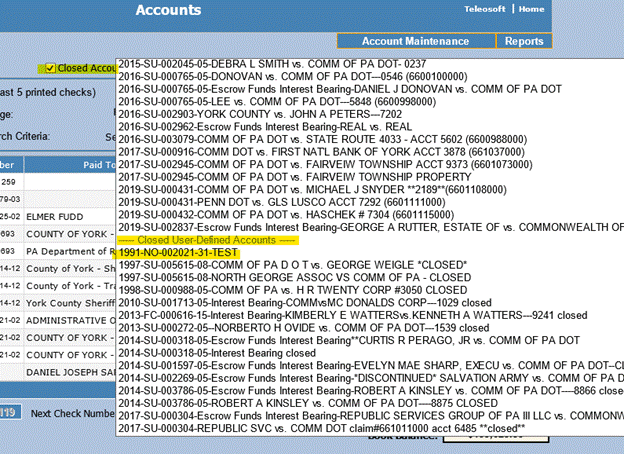
Note that when you close a UDA and want to search for it on the Accounts page, you need to select the Closed Accounts checkbox
---
[\[1\]](https://kb.arms.com/teleosoft/how-to-user-guide-user-defined-accounts#_ftnref1) I say “view” and not “page” because it’s technically the same Accounts, Deposits, and Reconciliations pages. It’s just that a new case specific Account is available in the Account dropdowns of those pages (see screenshots below).
[\[2\]](https://kb.arms.com/teleosoft/how-to-user-guide-user-defined-accounts#_ftnref2) This is by no means the *only* way to configure it. It could be configured for an initial filing type as well.
- [Teleosoft Documents](https://kb.arms.com/teleosoft/teleosoft-documents?hsLang=en#main-content)
- [Test](https://kb.arms.com/teleosoft/teleosoft-documents?hsLang=en#test)
- [Courts](https://kb.arms.com/teleosoft/courts?hsLang=en#main-content)
- [Civil Court](https://kb.arms.com/teleosoft/courts?hsLang=en#civil-court)
- [CA Sheriff](https://kb.arms.com/teleosoft/ca-sheriff?hsLang=en)
[mailto:support@arms.com](mailto:support@arms.com)
Copyright © 2026, End2End Public Safety