---
title: General Ledger Account Setup
description: General Ledger Account Setup
---
[Skip to content](https://kb.arms.com/ticketrak/general-ledger-account-setup#main-content)
English
Show submenu for translations

Open main navigation
Close main navigation
- English
Show submenu for translations
- [Customer Portal](https://helpdesk.arms.com/tickets)
[Customer Portal](https://helpdesk.arms.com/tickets?hsLang=en)
How can we help you?
- There are no suggestions because the search field is empty.
1. [TickeTrak](https://kb.arms.com/ticketrak?hsLang=en)
2. [TickeTrak Admin](https://kb.arms.com/ticketrak/ticketrak-admin?hsLang=en)
# General Ledger Account Setup
### ***General Ledger Account Setup***
General Ledger allows you to set up specific Accounts and what finance and transaction information each one is sent. Once the Accounts are set up, you can Export the associated data using the Payment Transaction Export type.
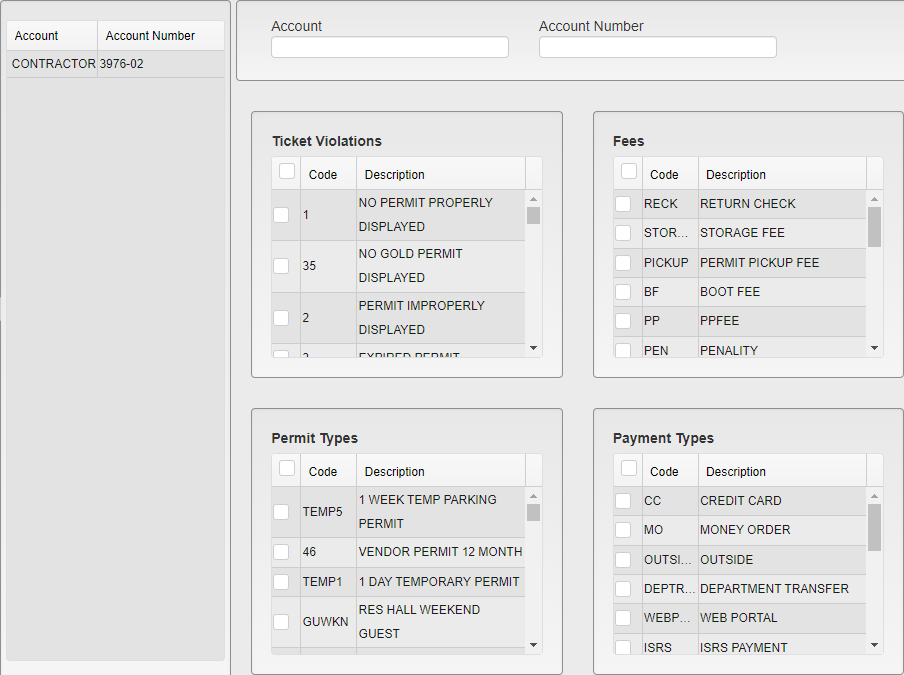
*General Ledger Settings*
Existing Accounts are listed on the left side of the settings. Clicking on one of these loads the selections for that Account for editing.
Enter the **Account** name and **Account Number** for this record.
Select all of the **Ticket Violations**, **Fees**, **Permit Types**, and **Payment Types** that will be included in records generated for this Account.
Payment Types combines with the other options to further narrow the data included. For example, if Permit Type 1A is selected and Payment Type Contactor is selected, it will only pick up 1A Permits that were paid with the Contactor Permit Type.
Click Save in the upper right to save any changes made. Click Clear to erase all selections currently in the form and begin a new Account entry.
- [TickeTrak Admin](https://kb.arms.com/ticketrak/ticketrak-admin?hsLang=en)
- [TickeTrak User](https://kb.arms.com/ticketrak/ticketrak-user?hsLang=en)
- [TickeTrak Mobile](https://kb.arms.com/ticketrak/ticketrak-mobile?hsLang=en)
- [Release Notes](https://kb.arms.com/ticketrak/release-notes?hsLang=en)
[mailto:email@email.com](mailto:email@email.com)
Copyright © 2026, End2End Public Safety