---
title: Global Search
description: Global Search
---
[Skip to content](https://kb.arms.com/ticketrak/global-search#main-content)
English
Show submenu for translations

Open main navigation
Close main navigation
- English
Show submenu for translations
- [Customer Portal](https://helpdesk.arms.com/tickets)
[Customer Portal](https://helpdesk.arms.com/tickets?hsLang=en)
How can we help you?
- There are no suggestions because the search field is empty.
1. [TickeTrak](https://kb.arms.com/ticketrak?hsLang=en)
2. [TickeTrak User](https://kb.arms.com/ticketrak/ticketrak-user?hsLang=en)
# Global Search
### ***Global Search***
At the top of Glocal Search there is a checkbox.

*Limit TreeView Results*
If this is checked, then the results will only show items that are directly related to the search.
All fields are searchable. Multiple fields within each section can be used at the same time. The search requires the field that is currently active (has the cursor in it and has a blue highlight around it) to be filled out when the search is performed.

*An Active Field*
All searches are saved in the bottom section. The search can be run again by selecting the desired record. These records can be deleted by clicking **Clear Grid**.
If no match is found, a notice saying so will be shown. Clicking **Yes** opens the relevant module for data entry.
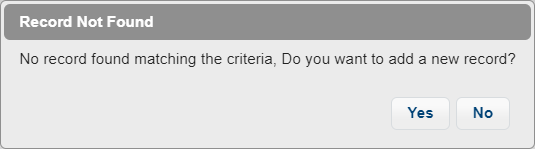
*Record Not Found*
If a single match is found, that entry will be selected and loaded automatically. If multiple potential matches are found, a list with relevant results will appear. All searches in Global Search are partial searches and will look for entries that begin with the provided information.

*Search Results*
The example above was a search for “SA” in the **Last Name** field.
Click **Select** next to the entry you are looking for to load the information into the TreeView. Click **Cancel** in the upper right of the window to return to Global Search.
- [TickeTrak Admin](https://kb.arms.com/ticketrak/ticketrak-admin?hsLang=en)
- [TickeTrak User](https://kb.arms.com/ticketrak/ticketrak-user?hsLang=en)
- [TickeTrak Mobile](https://kb.arms.com/ticketrak/ticketrak-mobile?hsLang=en)
- [Release Notes](https://kb.arms.com/ticketrak/release-notes?hsLang=en)
[mailto:email@email.com](mailto:email@email.com)
Copyright © 2026, End2End Public Safety