---
title: Late Fees
description: Late Fees
---
[Skip to content](https://kb.arms.com/ticketrak/late-fees#main-content)
English
Show submenu for translations

Open main navigation
Close main navigation
- English
Show submenu for translations
- [Customer Portal](https://helpdesk.arms.com/tickets)
[Customer Portal](https://helpdesk.arms.com/tickets?hsLang=en)
How can we help you?
- There are no suggestions because the search field is empty.
1. [TickeTrak](https://kb.arms.com/ticketrak?hsLang=en)
2. [TickeTrak Admin](https://kb.arms.com/ticketrak/ticketrak-admin?hsLang=en)
# Late Fees
### Late Fees
Created by Joshua Hall, Modified on Fri, 14 Nov, 2025 at 12:20 PM by Joshua Hall
### ***Late Fees***

*Late Fees TreeView*
### **General Settings**
Late Fees are added to unpaid Tickets that meet the selected criteria. Multiple levels of Late Fees can be set up per violation. Late Fees can be run as a scheduled procedure after it has been set up.
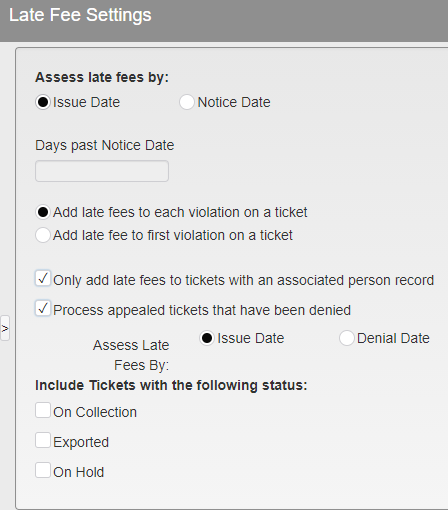
*Late Fee Settings*
**Assess late fees by:**
- *Issue Date* - Issue date of the Ticket.
- *Notice Date* - If by Notice date, how many days past Notice Date or Appeal Denial Date.
*Add late fees to each violation on a ticket* - If multiple violations are added per ticket a late fee will be added to each one.
*Add late fees to first violation on a ticket* - Only one Late Fee will be added per Ticket.
*Only add late fees to tickets with than associated person record* - Tickets must have an associated Person before Late Fees are applied.
*Process appeal tickets that have been denied* - Late Fees are not added while a ticket is on Appeal. You may add Late Fees if the Appeal has been denied. If this option is checked, you may **Assess Late Fees By:**
- *Issue Date* - Issue date of the Ticket.
- *Denial Date* - Denial date of the Appealed Ticket.
**Include tickets with the following status** - Late Fees will not be added to Tickets with the following status unless checked.
- *On Collection*
- *Exported*
- *On Hold*
### **Late Fee Structure**
Late Fee Structure allows the setup of a distinct Late Fee for every violation. Multiple levels are allowed. The Ticket must have a Level 1 Late Fee prior to receiving a Level 2, a Level 2 Late Fee prior to receiving a Level 3, etc.
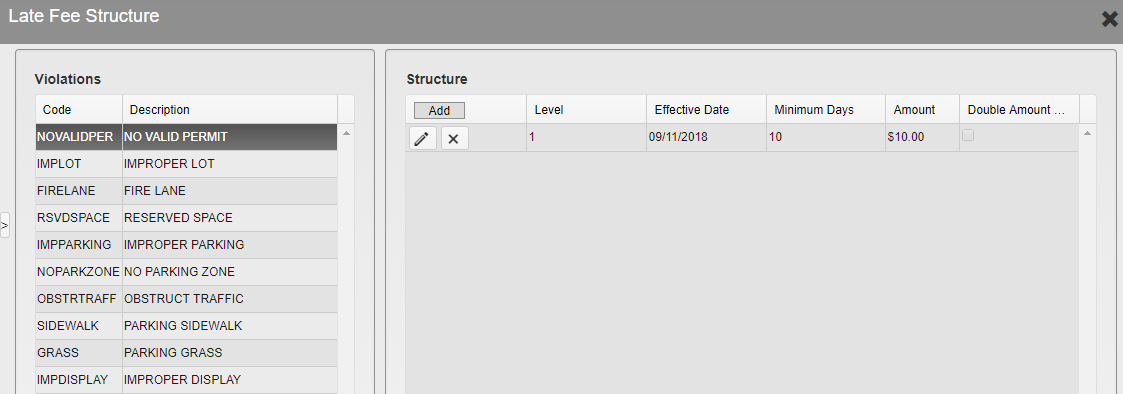
*Late Fee Structure Menu*
All violations are listed on the left side.
Select a **Violation** by clicking it. The **Structure** may then be added, edited, or deleted.
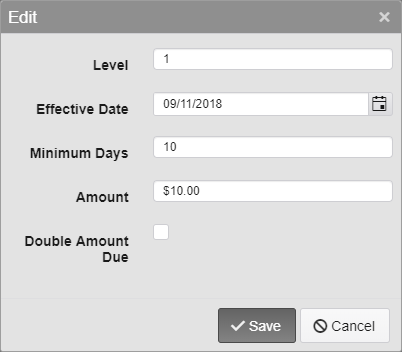
*Late Fee Options*
**Level** - Select the level of the Late Fee.
**Effective Date** - Select the date the Late Fee should be effective. Tickets that meet the requirements but were issued before this date will not have the Late Fee added.
**Minimum Days** - Select the minimum number of days the Ticket must be unpaid before a Late Fee is added.
**Amount** - Select the amount of the Late Fee to be added.
**Double Amount Due** -Double the amount due on a Ticket rather than adding a set Fee.
- [TickeTrak Admin](https://kb.arms.com/ticketrak/ticketrak-admin?hsLang=en)
- [TickeTrak User](https://kb.arms.com/ticketrak/ticketrak-user?hsLang=en)
- [TickeTrak Mobile](https://kb.arms.com/ticketrak/ticketrak-mobile?hsLang=en)
- [Release Notes](https://kb.arms.com/ticketrak/release-notes?hsLang=en)
[mailto:email@email.com](mailto:email@email.com)
Copyright © 2026, End2End Public Safety