---
title: Scofflaw
description: Scofflaw
---
[Skip to content](https://kb.arms.com/ticketrak/scofflaw#main-content)
English
Show submenu for translations

Open main navigation
Close main navigation
- English
Show submenu for translations
- [Customer Portal](https://helpdesk.arms.com/tickets)
[Customer Portal](https://helpdesk.arms.com/tickets?hsLang=en)
How can we help you?
- There are no suggestions because the search field is empty.
1. [TickeTrak](https://kb.arms.com/ticketrak?hsLang=en)
2. [TickeTrak Admin](https://kb.arms.com/ticketrak/ticketrak-admin?hsLang=en)
# Scofflaw
### ***Scofflaw***
Scofflaw Codes can be placed on Vehicles to indicate issues and special statuses related to that Vehicle. Scofflaw Codes can be made for Tickets or Permits, and have a number of options.
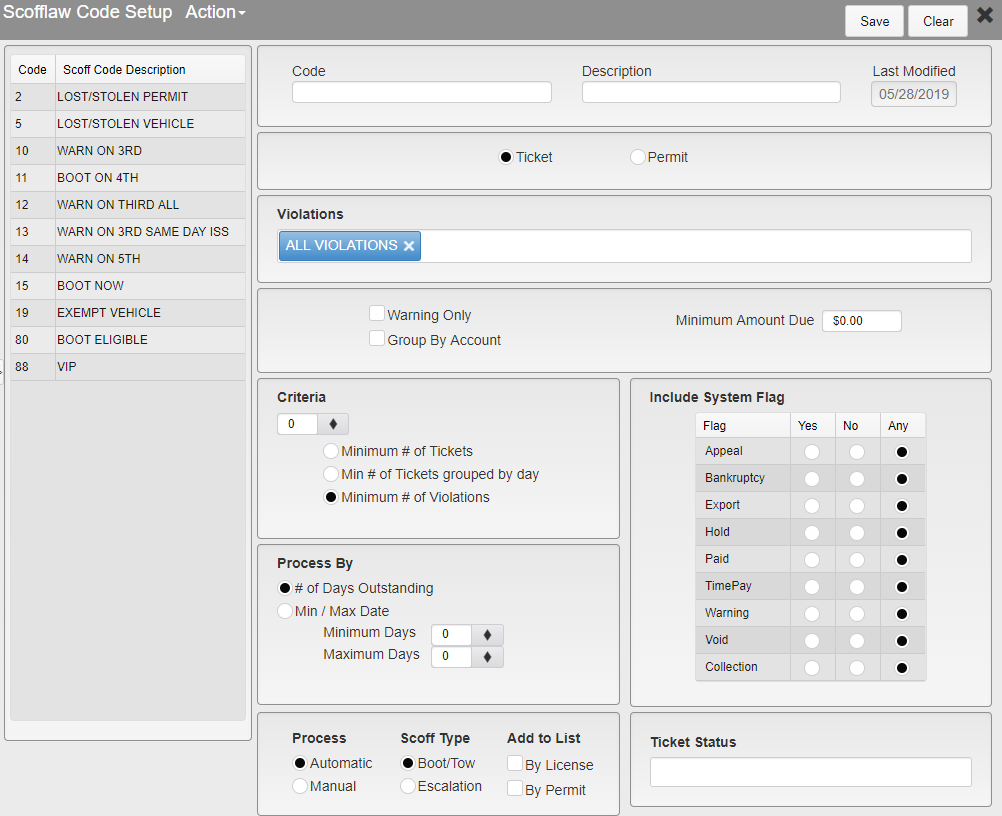
*Scofflaw Code Setup*
To make a new Scofflaw Code, enter the information into the blank form and click **Save** in the upper right.
To edit an existing Scofflaw Code, click on the code you wish to edit in the list on the left. The selected Scofflaw Code will be highlighted and its information will populate the form.
**Code** - Enter the Code for the Scofflaw Code. 4 character limit. Numbers only.
**Description** - Enter a description for the Scofflaw Code.
**Last Modified** - This field shows the date of the last changes made to the Scofflaw Code. It will automatically update with the current date when you click **Save**.
*Ticket* or *Permit* - Select whether the Scofflaw Code will apply to Tickets or Permits.
**Violations** / **Permit Types** - If *Ticket* is selected, this section will be labelled **Violations** and allow you to select the Violations that this Scofflaw Code may apply to. By default, *All Violations* is selected. Selecting a specific Violation will remove *All Violations*.
If *Permit* is selected, this section will be labelled **Permit Types** and allow you to select the Permit Types that this Scofflaw Code may apply to. By default, *All Permit Types* is selected. Selecting a specific Permit Type will remove *All Permit Types*.
**Warning Only** - Only active if *Ticket* is selected. Check this box if this Scofflaw Code can only apply to Warning Tickets.
**Group By Account** - Checking this box will group active Tickets by the Person account the Vehicles are attached to. This means that a Person will go on the Scoff list based on the total Tickets they have. If this is not checked, they will only be added to the Scoff list when they have the requisite number of Tickets on a single Vehicle.
**Minimum Amount Due** - Enter the Minimum Amonut Due on all of the related Tickets for this Scofflaw to come into effect.
**Criteria** - Only active if *Ticket* is selected. Enter a number that will replace the # and select one of the following options:
- *Minimum # of Tickets* - Select this option to apply this Scofflaw Code to Vehicles with at least # Tickets.
- *Min # of Tickets grouped by day* - Select this option to apply this Scofflaw Code to Vehicles with at least # Tickets issued on the same day.
- *Minimum # of Violations* - Select this option to apply this Scofflaw Code to Vehicles with at least # total Violations attached to them.
**Process By** - Select the frequency at which the Scofflaw Code will be processed.
- *# of Days Outstanding* - Process the Scofflaw Code based on the number of days a Ticket has been outstanding.
- This option has *Minimum Days* and *Maximum Days* boxes to enter the minimum and maximum number of days outstanding where the Scofflaw Code will be applied.
- *Min / Max Date* - Process the Scofflaw Code based on the date the Ticket was issued.
- This option has *Minimum Date* and *Maximum Date* boxes to enter the minimum and maximum issue dates for Tickets that the Scofflaw Code will be applied to.
**Process** - Select how to process the Scofflaw Code.
- *Automatic* - Process the Scofflaw Code on an automatic schedule.
- *Manual* - Process the Scofflaw Code only when manually run.
**Scoff Type** - Select the Scofflaw type.
- *Boot/Tow* - Vehicles with this Scofflaw Code will be marked as eligible for booting or towing.
- *Escalation* - Vehicles with this Scofflaw Code will be marked for escalation.
**Add to List** - Select how to add an entry to the Scoff List.
- *By License* - Check this box to add the Vehicle License Plate to the Scoff List.
- *By Permit* - Check this box to add the Permit associated with the Vehicle to the Scoff List.
**Include System Flag** - Check for the selected flags on the accounts related to the Vehicle, Ticket, or Permit with the Scofflaw Code attached to it. Select *Yes* to include accounts with that flag. Select *No* to exclude accounts with that flag. Select *Any* to not check for that flag.
- *Appeal*
- *Bankruptcy*
- *Export*
- *Hold*
- *Paid*
- *TimePay*
- *Warning*
- *Void*
- *Collection*
**Ticket Status / Permit Status** - Select Ticket or Permit Statuses to be attached to the Ticket or Permit in addition to the Scofflaw Code.
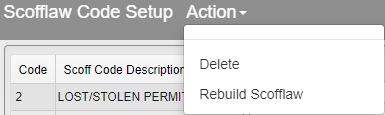
*Scofflaw Code Action Bar*
**Delete** - Delete the current Scofflaw Code. You will be prompted to confirm that you wish to delete the Code.
**Rebuild Scofflaw** - This forces the Scofflaw List to be rebuilt, checking the database for Vehicles that need to be added or removed from the list. This process is scheduled to run daily, but this option can be used to update it between scheduled runs.
- [TickeTrak Admin](https://kb.arms.com/ticketrak/ticketrak-admin?hsLang=en)
- [TickeTrak User](https://kb.arms.com/ticketrak/ticketrak-user?hsLang=en)
- [TickeTrak Mobile](https://kb.arms.com/ticketrak/ticketrak-mobile?hsLang=en)
- [Release Notes](https://kb.arms.com/ticketrak/release-notes?hsLang=en)
[mailto:email@email.com](mailto:email@email.com)
Copyright © 2026, End2End Public Safety