
No recent searches
Popular Articles

Sorry! nothing found for
5.0 Release Notes
Created by Russ Hartle, Modified on Mon, 31 Mar, 2025 at 10:17 AM by Russ Hartle
Additions
- Multi-Factor Authentication for CIJS Compliance
- Recent CJIS security policy changes now mandate that all entities accessing CJI have an acceptable form of multi-factor authentication (MFA) by October 1st, 2024. In-Synch RMS has implemented MFA functionality in compliance with these policy changes. By default, MFA is disabled, please contact the Helpdesk to discuss in further detail.
- AOPC Certified Printable Traffic and Non-Traffic Citation
- The printable traffic and non-traffic citations have been updated and certified by the AOPC for use.
- System Generated Citation Numbers
- In-Synch RMS can now generate unique citation numbers in both the Traffic and Non-Traffic Citation modules. With this functionality, there are configuration options. The first option available is whether the agency wants each machine to have a cache (a block) of citation numbers stored locally. With citation numbers stored locally, a user can assign citation numbers while offline. The second option is changing the prefixes assigned to the citation number. By default, the number begins with a “P” for non-e-filing configurations and an “E” for e-filing configurations.
- Integrated Ability to File Traffic Citations Electronically
- In-Synch RMS has implemented functionality to file traffic citations electronically. This functionality has been AOPC-certified at our pilot agency.
Automatically Calculate Speeding Fines
- In-Synch RMS can now automatically calculate the fine for speeding violations based on the PA 3362/3365 sections. (This functionality is turned off by default.)
- Traffic Citation / Non-Traffic Citation
- Added an agency preference, allowing the county/municipality codes on traffic/non-traffic citations to be editable. (This functionality is turned off by default.)
- Added the following sliding scale fine logic when the “Fine” amount is zero or not entered.
- Blanks out the “Total Amount Due” on the citation data entry form.
- Shows the “Fine” and “Total Amount Due” as blank on the printable citation.
- Submits the AOPC desired value of “0.00” for the “Fine” and “Total Amount Due” in the electronic citation when configured for e-filing.
Additions/Changes on the Traffic Citation Data Entry Form
- Added a “Create” button to generate a unique citation number. (This button can be hidden if desired.)
- Added fields to indicate whether the citation was “Issued” or “Filed.” (Users must select an option to save the citation.)
- The field “Magistrate/Court” was updated to “Court.” This field no longer utilizes the list of magistrates from Person Management. Instead, it obtains a list of courts from the “Court Offices” tab in the Agency Module.
- In the past, these two fields were labeled “Vehicle 1” and “Vehicle 2”.
- The “JCP” amount is no longer editable inside the Traffic Citation window and relies on the standard value entered in the Agency module.
- Added “Emergency Response Area” as a fine doubled condition.
- Added “Litter Control Corridor” as a fine doubled condition.
- Added a field to indicate if the offense is an inchoate offense.
- Added a field to set the offense grade. (It is possible to configure a default value for this field.)
- A “Parking” checkbox was added to indicate that the citation is parking related.
- An “Ordinance” checkbox was added to indicate the violation is a local ordinance.
- A field called “Weather Conditions” was added to document weather conditions.
- A field called “Stopped By” was added to document the type of vehicle/equipment used when the subject was stopped.
- A field called “Observed By” was added to document the vehicle/equipment used when the subject was observed.
- Added a field called “Special Activity” to document any special activity occurring at the time of the incident.
Additions/Changes on the Non-Traffic Citation Data Entry Form
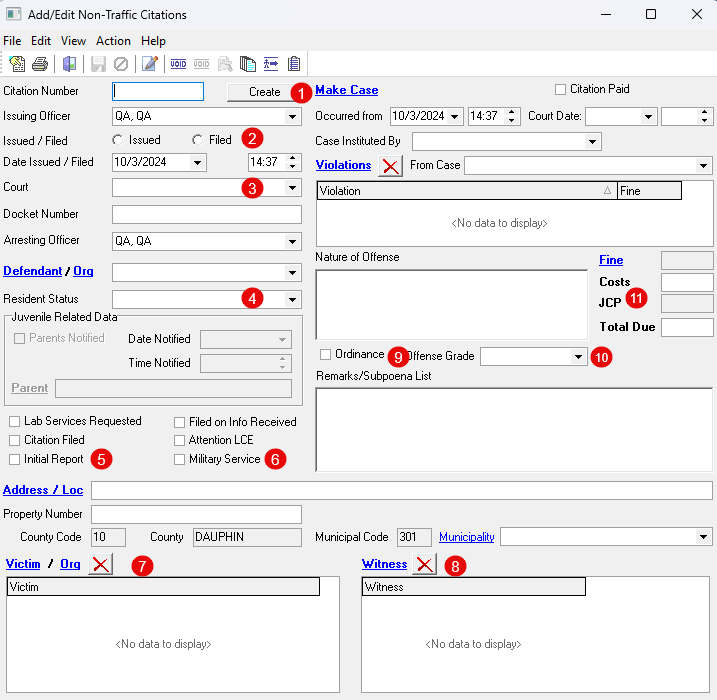
- Added a “Create” button to generate a unique citation number. (This button can be hidden if desired.)
- Added fields to indicate whether the citation was “Issued” or “Filed.” (Users must select an option to save the citation.)
- Updated the field “Magistrate/Court” to “Court.” This field no longer utilizes the list of magistrates from Person Management. Instead, it obtains a list of courts from the “Court Offices” tab in the Agency Module.
- Added field to indicate the “Resident Status” of the defendant.
- Added a checkbox to mark the citation as “Initial Report.”
- Added a checkbox to mark the citation as “Military Service.”
- Expanded the “Victim/Org” field to record multiple victims.
- Added a field to record the witness(es) of the violation.
- Added an “Ordinance” checkbox to indicate that the violation is a local ordinance.
- Added a field to set the offense grade. (It is possible to configure a default value for this field.)
- The “JCP” amount is no longer editable inside the Non-Traffic Citation window and relies on the standard value entered in the Agency module.
- Miscellaneous Additions
- Added a field in the Agency Module to permit the setting of the JCP amount for Non-Traffic Citations.
- Added a tab for “Court Offices” in the Agency Module.
- Added the “Affidavit of Probable Cause Continuation Page” to the PA Search Warrant.
- Added an agency preference that displays the affiant’s name and address on the confidential page of the PA Criminal Complaint.
- Added logic to prevent the creation of duplicate property barcodes.
- Added a validation message for FBI NIBRS error code 470 that pertains to cases where the victim is also an offender.
- Added the Search Warrant to the list of options that can be generated with the Case Report.
Changes
- Added AOPC Required Changes for the PA Search Warrant
- Added the latest PA Search Warrant that goes into effect October 1st, 2024. In the process of updating, we added the ability to generate multiple continuation pages for items seized and premises searched.
- Updated the NCIC Vehicle Make/Model List
- Updated the NCIC vehicle makes/models to match the current list from the AOPC. (The updated values are turned off by default but can be enabled at the agency level.)
- Updated PA Use of Force to Have Subject Charged
- The state of PA updated the Use of Force specification to include whether the subject was charged. The In-Synch RMS has been updated to include this change.
Traffic Citations
- The field “Magistrate/Court” was updated to “Court.” This field no longer utilizes the list of magistrates from Person Management. Instead, it obtains a list of courts from the “Court Offices” tab in the Agency Module.
- Removed the checkbox for “Radar Used.” Historical citations with radar used set will now have the “Speed Clocked Via” set to “Radar.”
- Changed the process of creating a citation from a parking ticket. With this change, the citation is made as soon as the “Create/View Citation” button is selected in the Parking Tickets module.
- Traffic / Non-Traffic Citation
- Enhanced the process of making a citation from a call/case. With this change, all contacts from the call/case are pulled into the citation with their corresponding contact role.
- Updated the WV Criminal Complaint to the latest state version
- Added defendants name to the mail in portion of the printable traffic citation.
Fixes
- Agency
- Corrected an issue that caused county codes with a leading zero to be stripped.
- Case Builder
- Resolved an infrequent issue that could cause unsaved offenses to be deleted from the case.
- PA Criminal Complaint
- Reordered the pages to match the AOPC standard.
- Made numerous small visual adjustments on various forms within the complaint.
- Updated the Victim/Witness Data Sheet to match the latest AOPC version.
- PA Juvenile Allegation
- Reordered the pages to match the AOPC standard.
- Made numerous small visual adjustments on various forms within the allegation.
- Fixed an issue with borders being cut off when printed.
- Adjusted the allegation to have the first number point start at the bottom of the first page of the allegation, not on the signature page.
- PA Search Warrant
- Fixed an issue with the “Date(s) of Violation” field incorrectly displaying the hour of violation.
- Fixed the name of the search warrant PDF generated via the email option.
- Fixed a display issue that would cause violations on the continuation page to disappear if you navigated forward and backward in the print preview.
- PA Use of Force
- Improved the logic used by the monthly Use of Force report to restrict unnecessary cases from being displayed.
- Fixed an issue related to UOF that under a particular set of events would cause cases in the tree view to duplicate.
- Vehicle Management
- Adjusted the process when scanning a vehicle registration to prompt the user to select a vehicle make when the make cannot be identified.
- Reports
- Fixed an issue that prevented reports from running without special configuration from the Helpdesk.
- UCR Summary Reporting
- Fixed an error that would occur on the FBI “UCR Return B2: Age Sex and Race of Arrestees 18 and Over” report.
- NIBRS Related
- Fixed an issue that triggered a synch constraint error when saving data on the IBRS “Victim Data” tab.
- Fixed an issue that prevented the validation message for an arrestee without a gender from occurring.
- Fixed an issue that triggered a warning for a deleted offender with a multi-arrest indictor value other than “NA” set.
- Adjusted the process for saving of the monthly submission file to reduce delays,
- Improved the internal process used to determine if a case has been submitted, and whether the case should be sent anew, or as a resubmission.
- Improved the ability for our NIBRS file to integrate easier with different versions of the RMS to increase the possibility of dropping it in place as a standalone upgrade in the future.
- Fixed an issue where certain cases would submit with duplicate IBRS offense codes.
- Traffic Citation
- Fixed an issue where a custom fine amount for a deleted violation would carry over to the new violation on the citation.
- Traffic / Non-Traffic Citation
- Fixed an issue where zeros showed as blanks on the printable citation.
Was this article helpful?
That’s Great!
Thank you for your feedback
Sorry! We couldn't be helpful
Thank you for your feedback
Let us know how can we improve this article!
Feedback sent
We appreciate your effort and will try to fix the article
X