
No recent searches
Popular Articles

Sorry! nothing found for
Adding a New Magistrate or Court
Created by Russ Hartle, Modified on Fri, 14 Nov, 2025 at 2:56 PM by Russ Hartle
Adding a New Magistrate or Court
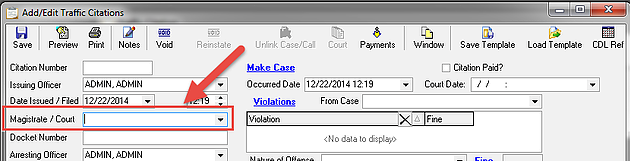
The “Magistrate / Court” drop-down list is available from within the Traffic and Criminal Citation modules. This list is populated by recording magisterial information against a person record (Magistrate) or against an organization record (Court). In Pennsylvania, the magistrate entries are also used on the State-wide Criminal Complaint.
Adding Magisterial Information to a Person Record
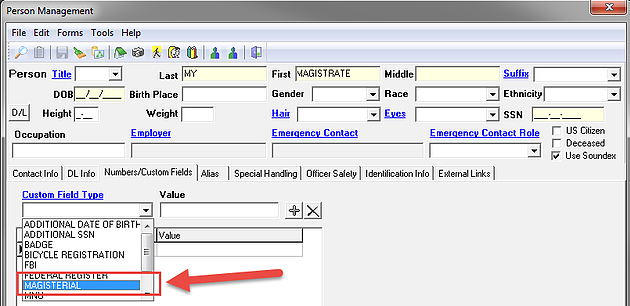
With the person record open, select “MAGISTERIAL” from the “Custom Field Type” drop-down list on the “Numbers/Custom Fields” tab.
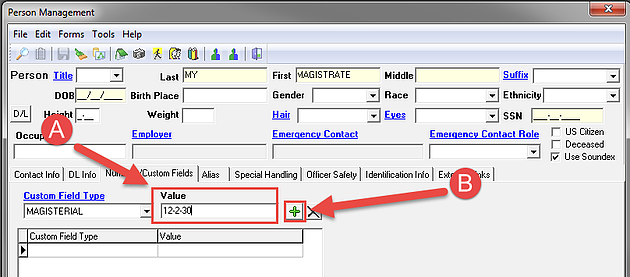
Enter a magisterial number into the “Value” field (A), select the “Add” button (B), and then save the record. Any text or number value can be used to designate a person as a magistrate. However, it is best practice to keep these values/numbers unique.
Adding Magisterial Information to an Organization Record
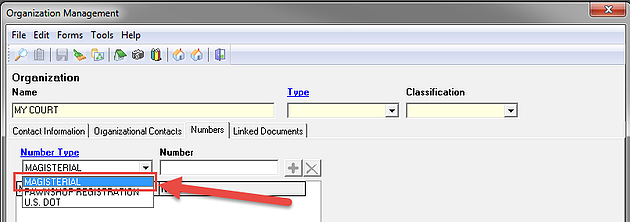
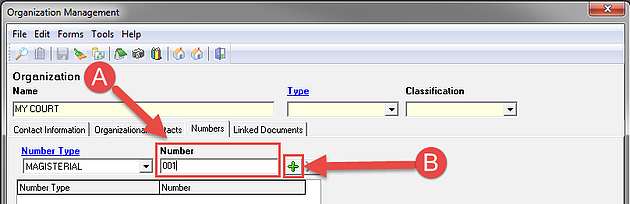
With the organization record open, select “MAGISTERIAL” from the “Number Type” drop-down list on the “Numbers” tab.
Enter a magisterial number into the “Number” field (A), select the “Add” button (B), and then save the record. Any text or number value can be used to designate an organization as a court. However, it is best practice to keep these values/numbers unique.
*Tips:
If “MAGISTERIAL” isn’t available from the “Custom Field Type” or “Number Type” drop-down lists, it can be added by any person with “Administrator” rights in the RMS.
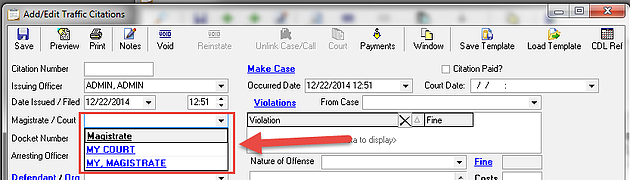
Once a person and/or organization records have been designated with magisterial/court values, they will be available for use from the “Magistrate/Court” drop-down list within the Traffic and Criminal citation modules.
Was this article helpful?
That’s Great!
Thank you for your feedback
Sorry! We couldn't be helpful
Thank you for your feedback
Let us know how can we improve this article!
Feedback sent
We appreciate your effort and will try to fix the article
X