
No recent searches
Popular Articles

Sorry! nothing found for
Adding Event Types
Created by Russ Hartle, Modified on Wed, 10 Sep, 2025 at 3:57 PM by Russ Hartle
Adding Event Types
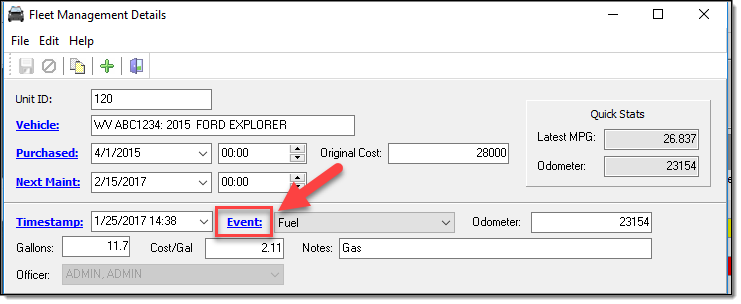
1. The Event drop down list is an editable pick list for personnel with administrative rights in the RMS. To add an item to the Event drop down list, select the blue link for “Event”.
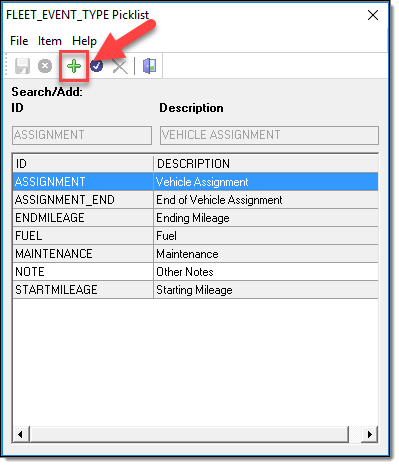
2. From the FLEET_EVENT_TYPE Picklist window, select the “Add” button.
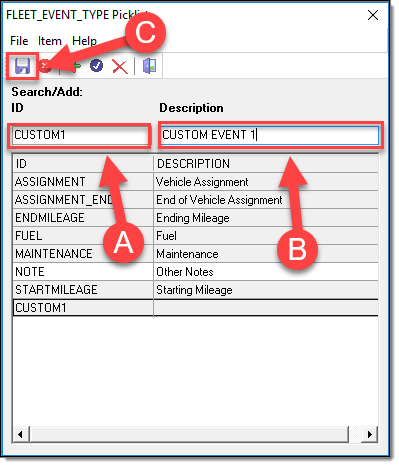
3. Enter a unique ID into the “Search/Add ID” field (A), enter a description into the “Description” field (B) and then select the “Save” button ( C ). Repeat these steps to add multiple items to the list.
*Tips:
For the Maintenance costs and MPG calculations to be correct on the main Fleet Management grid, the fuel must be entered under the event of “Fuel” and all maintenance must be entered under the event of “Maintenance”. If you add custom events like “GAS” or “OIL CHANGE”, these values won’t be factored into the respective “Fuel” and “Maintenance” totals. It is best practice to enter a new “Maintenance” event and record “Oil change” in the notes field.
Was this article helpful?
That’s Great!
Thank you for your feedback
Sorry! We couldn't be helpful
Thank you for your feedback
Let us know how can we improve this article!
Feedback sent
We appreciate your effort and will try to fix the article
X