
No recent searches
Popular Articles

Sorry! nothing found for
Approved Assignments
Created by Russ Hartle, Modified on Tue, 27 May, 2025 at 10:26 AM by Russ Hartle
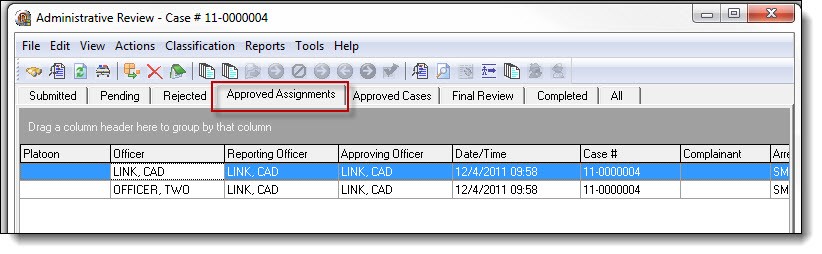
1. A case in the Approved Assignments tab means that an individual case assignment has been reviewed and approved. It also tells us that either more than one officer is assigned to the case or that a supplemental report has been assigned. The Approved Assignments tab is used as a temporary holding bin for cases with more than one assignment.
For example, we might have four officers all working on the same case. Three of the officers have completed their narrative and have submitted their case work. (Supervisors have the ability to approve each officer’s work.) The three submitted assignments are then approved by the supervisor. These assignments are temporarily placed in the Approved Assignments tab until the fourth officer’s work has been submitted and approved. Once all case assignments have been approved, all four pieces of the case will be joined together and placed in the Approved Cases tab. It is normal to see multiple assignments with the same case number in the Approved Assignments tab.
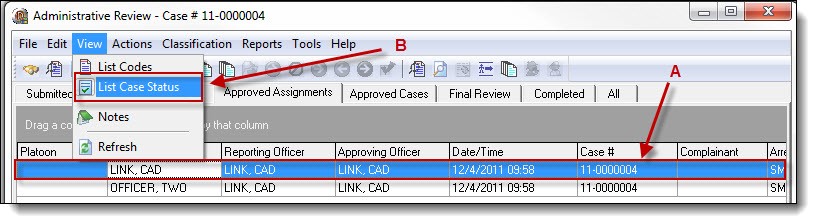
2. To view the status of all case assignments, highlight the case in the Admin Review grid (A), and then select “List Case Status” (B), from the View drop down list.
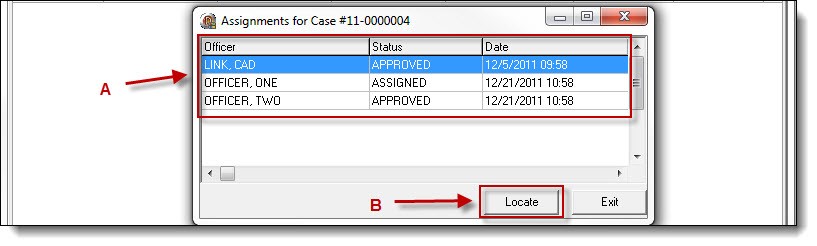
3. Each assignment will display the officer, status of the assignment, and the date/time that the assignment was created. To locate a specific assignment, highlight the assignment (A), and then click the “Locate” button (B). Users will be taken to the proper tab and assignment.
Was this article helpful?
That’s Great!
Thank you for your feedback
Sorry! We couldn't be helpful
Thank you for your feedback
Let us know how can we improve this article!
Feedback sent
We appreciate your effort and will try to fix the article
X