
No recent searches
Popular Articles

Sorry! nothing found for
Approved Cases
Created by Russ Hartle, Modified on Tue, 27 May, 2025 at 10:23 AM by Russ Hartle
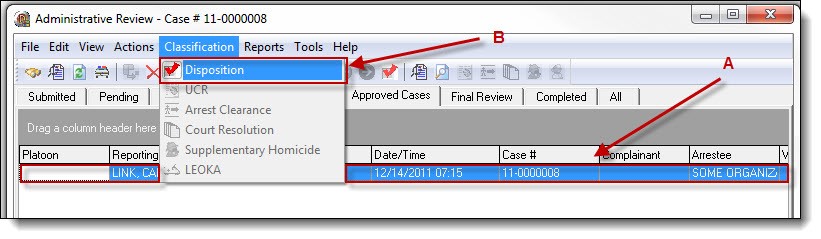
1. In order to move a case through its proper life-cycle, cases in the Approved Cases tab must have their disposition set. Highlight the case (A), and then select “Disposition” from the Classification drop down list (B).
2. Select a choice from the Disposition drop down list (A), then click the “OK” button (B).

!Did You Know?
Disposition is only available from the Approved Cases, Final Review, or the Completed tabs.
*Tips:
The Disposition Drop Down list is editable by Administrative users. To edit the list, click the blue word ‘Disposition’, and add, edit, or remove any choices from the list.
Was this article helpful?
That’s Great!
Thank you for your feedback
Sorry! We couldn't be helpful
Thank you for your feedback
Let us know how can we improve this article!
Feedback sent
We appreciate your effort and will try to fix the article
X