
No recent searches
Popular Articles

Sorry! nothing found for
Archiving Cases
Created by Russ Hartle, Modified on Tue, 27 May, 2025 at 10:25 AM by Russ Hartle
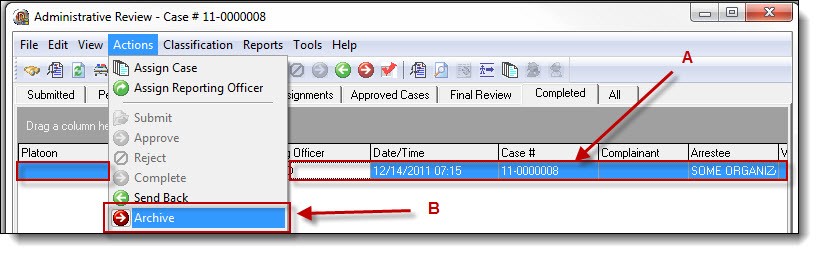
1. The final step in a case’s life-cycle is archiving. Depending on the size of the agency and the case volume the agency encounters, users may need to increase or decrease the frequency with which they archive cases. Users can archive a single case by highlighting the case in the Completed tab (A), and then select “Archive” from the Actions drop down list (B).
 !Did You Know?
- Agencies with lower case volume may only need to archive their cases once every 6 months or once per year. Agencies with large cases volumes need to complete a case’s life-cycle and archive cases on at least a monthly basis.
- You can select multiple cases for archiving by holding down the “Ctrl” key and selecting the cases or select all of the cases in the Completed tab by using the Windows keyboard shortcut of “Ctrl + a”. Once the cases have been highlighted, click “Archive” from the Actions drop down list.
Was this article helpful?
That’s Great!
Thank you for your feedback
Sorry! We couldn't be helpful
Thank you for your feedback
Let us know how can we improve this article!
Feedback sent
We appreciate your effort and will try to fix the article
X