
No recent searches
Popular Articles

Sorry! nothing found for
Case Involvement Tab
Created by Russ Hartle, Modified on Wed, 10 Sep, 2025 at 3:49 PM by Russ Hartle
Case Involvement Tab
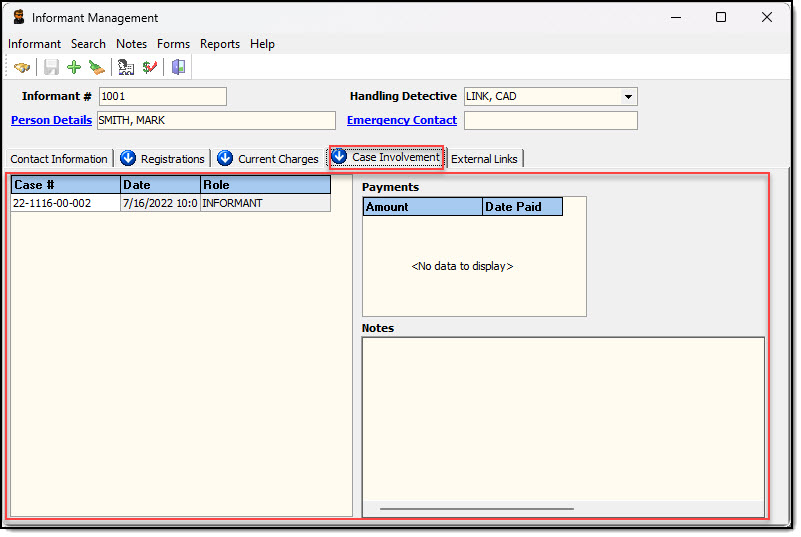
1. The Case Involvement tab displays any calls or cases in which the confidential informant is a contact with the role of informant.
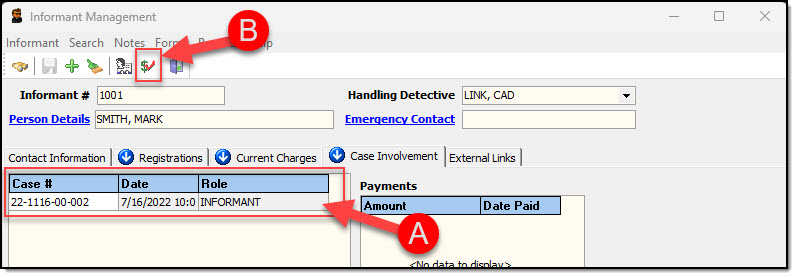
2. The Case Involvement tab also allows the user to record any payments that were made to the Informant. Highlight the call/case number from the grid (A), and then click the “Payments” button (B).
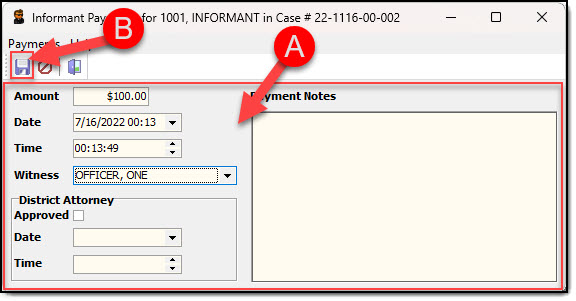
3. The Payment window has fields for recording: Amount, Date/Time, Witness, District Attorney Approval, and Notes information. Enter the payment information (A), and then click the “Save” button (B).
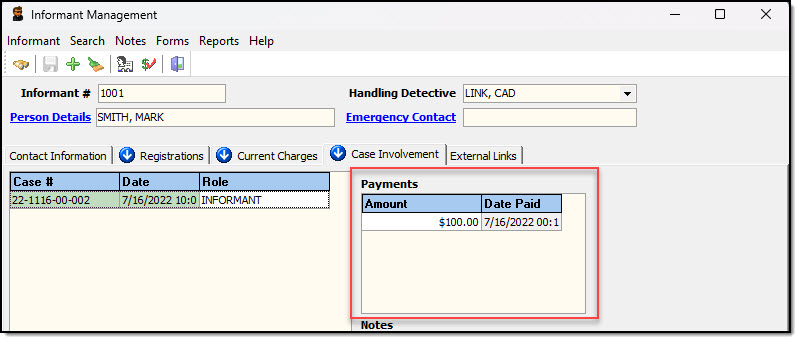
4. Payment information will be displayed under the Payments box on the Case Involvement tab.
Was this article helpful?
That’s Great!
Thank you for your feedback
Sorry! We couldn't be helpful
Thank you for your feedback
Let us know how can we improve this article!
Feedback sent
We appreciate your effort and will try to fix the article
X