
No recent searches
Popular Articles

Sorry! nothing found for
Concealing an Offense Section
Created by Russ Hartle, Modified on Thu, 11 Sep, 2025 at 3:54 PM by Russ Hartle
Concealing an Offense Section
If an offense section is no longer valid but has been used in the RMS, the system will not allow it to be deleted. Administrators can hide the offense section from the list of available choices in the RMS.
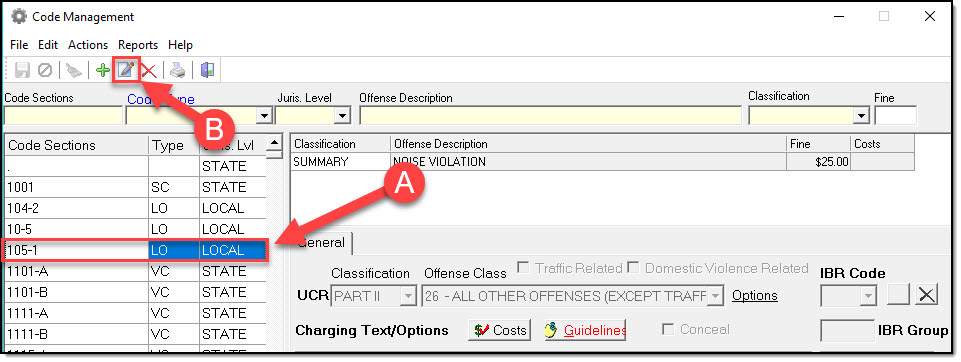
1. To conceal an offense, highlight the section in the offense list (A), and then click the “Edit” button (B).
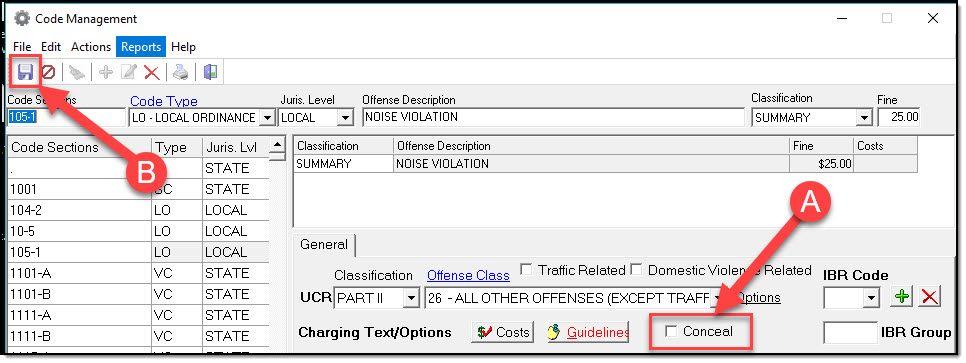
2. Select the “Conceal from picker” checkbox (A), and then click the “Save” button (B).
 !Did You Know?
- RMS users will not see a concealed offense section in the list of available offenses from within Case Builder.
- Any person with administrator access will still see the concealed offense section in the list of offenses.
Was this article helpful?
That’s Great!
Thank you for your feedback
Sorry! We couldn't be helpful
Thank you for your feedback
Let us know how can we improve this article!
Feedback sent
We appreciate your effort and will try to fix the article
X