
No recent searches
Popular Articles

Sorry! nothing found for
Editing Location/Staff
Created by Russ Hartle, Modified on Thu, 3 Apr, 2025 at 2:54 PM by Russ Hartle
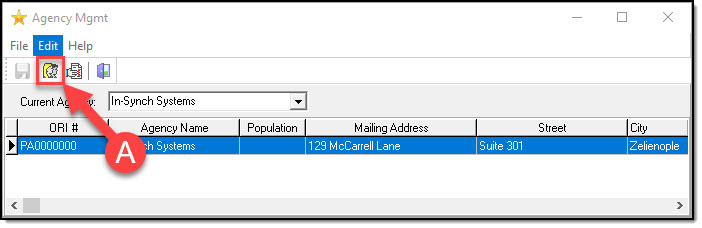
Most of the Agency information will be preconfigured before installation, but we understand that, with time, agencies move, administration changes, and staff levels fluctuate. These are pieces of information that can be changed without issue. To start, press the ‘Edit Agency Info’ button (A).
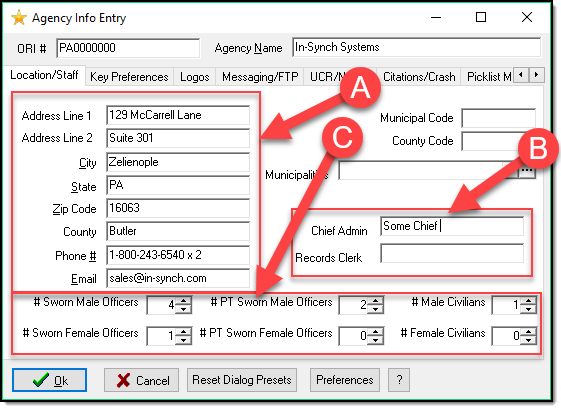
On the Agency Info Entry, you can edit the agency address, phone number, and email (A). You can fill in the Chief Admin, and the Records Clerk (B). Finally, you can adjust the amount of full time, part time, and civilian staff you have ( C ). When you are finished, press the OK button.
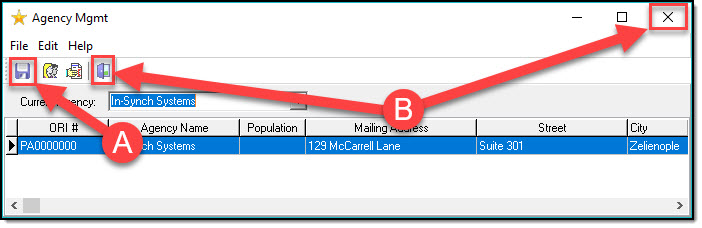
If you have made any changes, remember to Save them on the main Agency Management screen (A). Then exit the Agency Management module when you are ready (B).
Was this article helpful?
That’s Great!
Thank you for your feedback
Sorry! We couldn't be helpful
Thank you for your feedback
Let us know how can we improve this article!
Feedback sent
We appreciate your effort and will try to fix the article
X