
No recent searches
Popular Articles

Sorry! nothing found for
External Links Tab
Created by Russ Hartle, Modified on Wed, 10 Sep, 2025 at 3:49 PM by Russ Hartle
External Links Tab
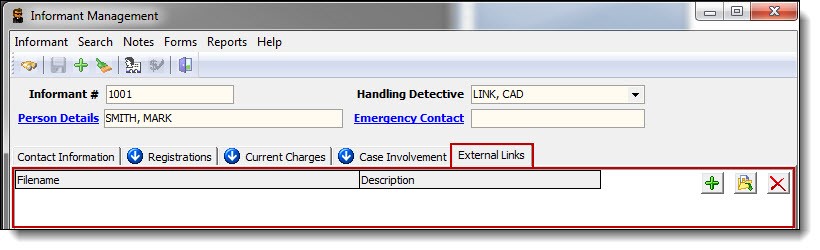
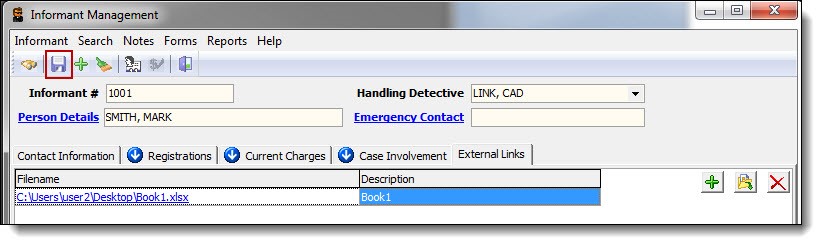
1. The External Links tab displays any external information associated with the informant.
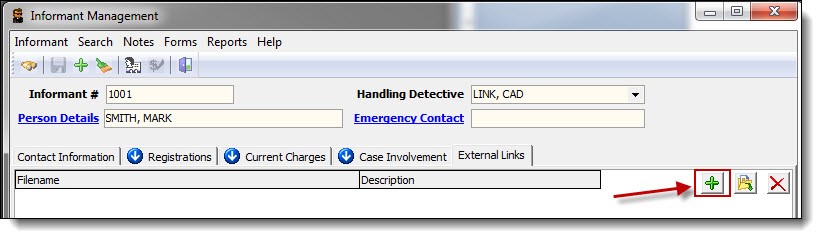
2. To add a new external link, click the “Add” button.
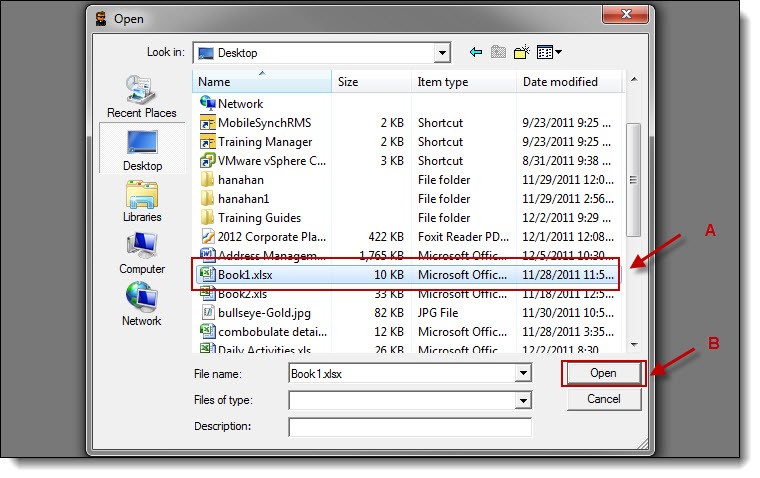
3. Browse to the location of the file you wish to associate with the informant (A), and then click the “Open” button (B).
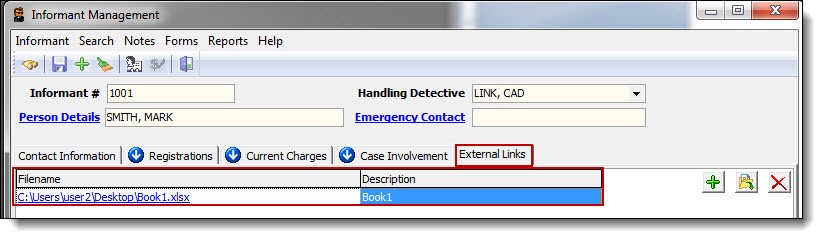
4. Both existing and new links will be displayed under the External Links tab.
!Did You Know?
External Links can be documents, audio, video, websites, etc. It is recommended that all external links be stored on a shared or network drive that each personnel member of the Criminal Investigators group can access. External links are “Links” and are not directly saved in the database. Therefore, moving or renaming the files will cause broken links and the inability to access the files from within the RMS.
5. Click the “Save” button to confirm the addition of the new external link.
Was this article helpful?
That’s Great!
Thank you for your feedback
Sorry! We couldn't be helpful
Thank you for your feedback
Let us know how can we improve this article!
Feedback sent
We appreciate your effort and will try to fix the article
X