
No recent searches
Popular Articles

Sorry! nothing found for
Getting Started\Adding Street Names
Created by Russ Hartle, Modified on Fri, 12 Sep, 2025 at 3:31 PM by Russ Hartle
Getting Started
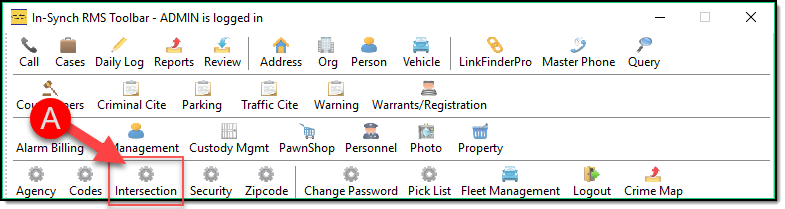
Intersection Management is a configuration module for creating and managing the Intersections used throughout the In-Synch RMS software. By default, Intersection Management is granted to members of the Administrator security group but can be granted or denied for any user. To access Intersection Management, click the “Intersection” button (A) on the main In-Synch RMS toolbar.
Adding Street Names
For this example, we will enter one main road that has three intersecting roads.
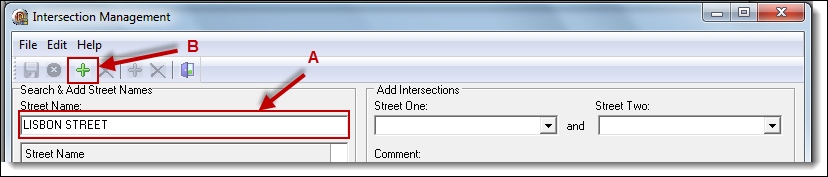
1. From the Intersection Management window, enter the main road’s name into the “Street Name” field (A), and then click the “Add” button (B).
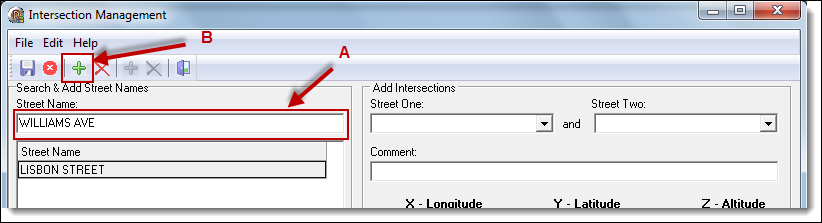
2. Enter the first intersecting road’s name into the “Street Name” field (A), and click the “Add” button (B). Repeat for the second and third intersecting roads.
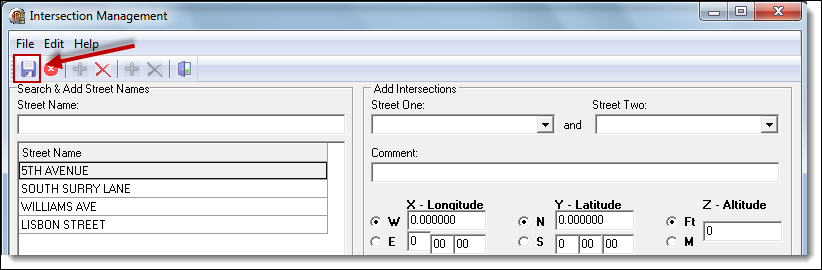
3. Click the “Save” button to save the four road entries.
Was this article helpful?
That’s Great!
Thank you for your feedback
Sorry! We couldn't be helpful
Thank you for your feedback
Let us know how can we improve this article!
Feedback sent
We appreciate your effort and will try to fix the article
X