
No recent searches
Popular Articles

Sorry! nothing found for
Linking an Owner to the Vehicle
Created by Russ Hartle, Modified on Fri, 20 Jun, 2025 at 2:30 PM by Russ Hartle
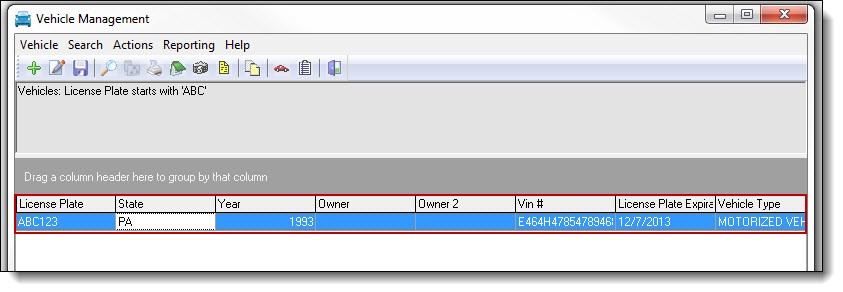
1. Double click the vehicle from the Vehicle Management grid to reopen the details window.
*Tips:
Linking an owner to a vehicle does not have to be done separately; it can be completed while entering/editing the vehicle details.
2. Click on the word “Owner” at the bottom of the Vehicle details window.

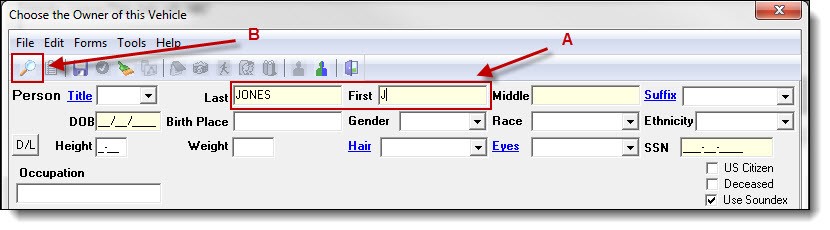
3. Enter part of the person’s last name, first name, or both (A), and then click the “Search” button (B) to see if the person exists in your database.
4. Follow steps 3a-4a from the Searching and Entering a Person section of the Person Management chapter for instructions on saving a new person record, or choosing an existing person record.
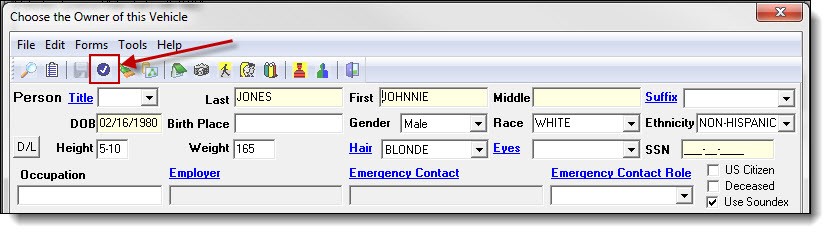
5. Once a person record has been created or chosen, click the “Choose” button at the top of the Person Management window.
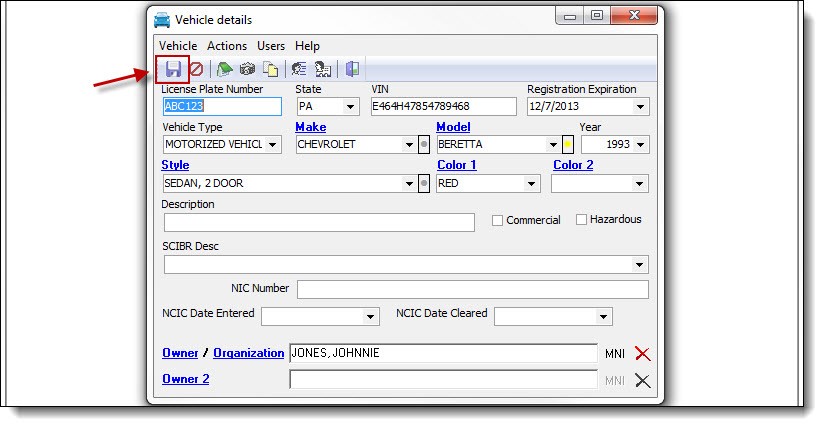
6. Save the linked owner by clicking on the “Save” button on the Vehicle details window.
!Did You Know?
The previous example showed how to link a person as the vehicle’s owner. If the owner is a business or organization, click the word “Organization” and follow steps 3a-4a from the Searching and Entering an Organization section of the Organization Management chapter for instructions on saving a new organization record or choosing an existing organization record.
Was this article helpful?
That’s Great!
Thank you for your feedback
Sorry! We couldn't be helpful
Thank you for your feedback
Let us know how can we improve this article!
Feedback sent
We appreciate your effort and will try to fix the article
X