
No recent searches
Popular Articles

Sorry! nothing found for
PA Search Warrant - Getting Started
Created by Kris Wahler, Modified on Thu, 3 Apr, 2025 at 4:01 PM by Kris Wahler
Getting Started
This guide is designed to show the steps needed to generate a Pennsylvania Search Warrant Request form. The Pennsylvania Search Warrant can be found inside the Case Builder module of In-Synch RMS.
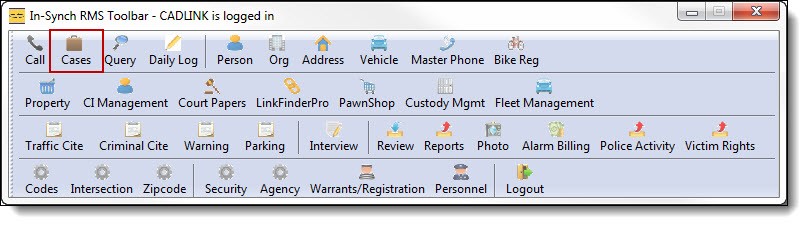
1. Click on the “Cases” button from the main RMS toolbar to open Case Builder.
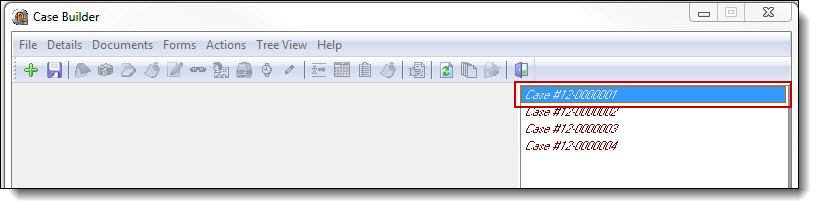
2. Double click on a case to open it in Case Builder.
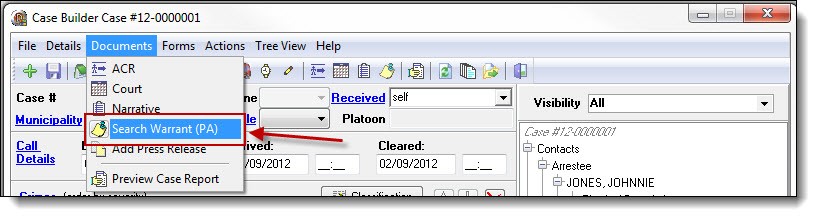
3. Select “Search Warrant (PA)” from the Documents drop down list.
Was this article helpful?
That’s Great!
Thank you for your feedback
Sorry! We couldn't be helpful
Thank you for your feedback
Let us know how can we improve this article!
Feedback sent
We appreciate your effort and will try to fix the article
X