
No recent searches
Popular Articles

Sorry! nothing found for
Printing and Saving the Linkfinder Window
Created by Russ Hartle, Modified on Fri, 20 Jun, 2025 at 2:36 PM by Russ Hartle
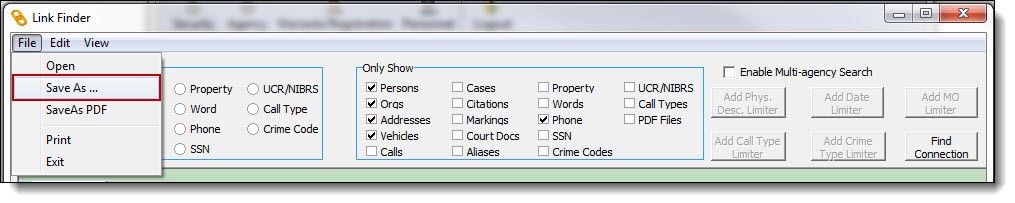
1. To print the LinkFinder results, select “Print” from the File drop-down list.

2. To save the LinkFinder results, select “Save As” from the File drop-down list.
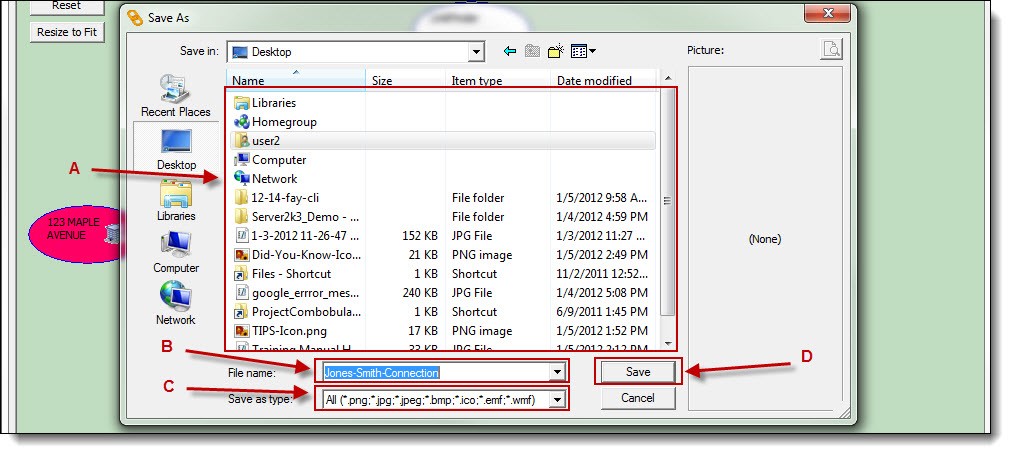
3. Select the save location (A), enter the file name (B), select the image type (C.), then click the “Save” button (D).
!Did You Know?
Once an image of the LinkFinder connection has been saved, it may be linked to a call, case, address, person, organization, or vehicle record for future viewing.
Was this article helpful?
That’s Great!
Thank you for your feedback
Sorry! We couldn't be helpful
Thank you for your feedback
Let us know how can we improve this article!
Feedback sent
We appreciate your effort and will try to fix the article
X