
No recent searches
Popular Articles

Sorry! nothing found for
Submitting the Case for Supervisor Approval
Created by Russ Hartle, Modified on Thu, 22 May, 2025 at 3:53 PM by Russ Hartle
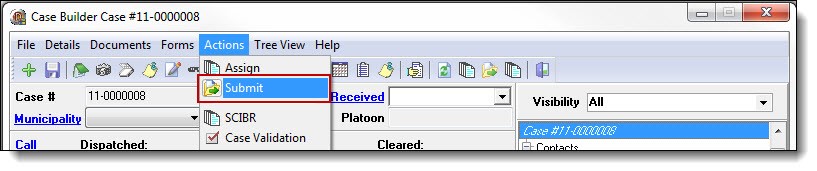
1. Once a case assignment has been completed, select “Submit” from the Actions drop down list to submit the case for supervisor approval.
*Tips:
You may be prompted with warnings if your case is missing pertinent information such as; a victim, proper contact information, missing or incorrect state reporting information, etc.
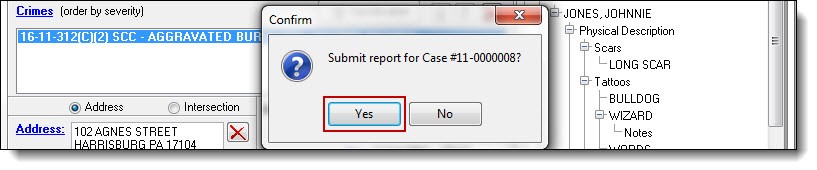
2. Once any outstanding issues have been addressed, click “Yes” to confirm the submission.
!Did You Know?
Once a case has been submitted, it is removed from your list of active cases. To do a follow-up on a case, refer to the Assigning a Case Follow-up chapter.
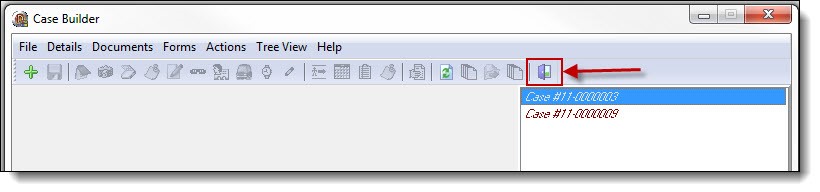
3. Click the “Exit” button to close Case Builder.
Was this article helpful?
That’s Great!
Thank you for your feedback
Sorry! We couldn't be helpful
Thank you for your feedback
Let us know how can we improve this article!
Feedback sent
We appreciate your effort and will try to fix the article
X