
No recent searches
Popular Articles

Sorry! nothing found for
Unable to Generate Property Barcode
Created by Russ Hartle, Modified on Tue, 11 Nov, 2025 at 10:30 AM by Russ Hartle
* Issue: User selects a property item and chooses to generate the property barcode. The property barcode window opens, but the barcode does not display, and the window becomes unresponsive until a task kill.
- Affected In-Synch Version: 4.8.2 thru 4.8.2 05/23/2018
Identify Troubled Storage Containers
- Run the following SQL statement and place the output in “sheet1” of a blank excel spreadsheet. If the SQL comes returns zero data then the property container hierarchy is flat.
- select P.CONTAINER_TYPE_ID, P.CONTAINER_ID, P.DELETED_TS, P.CONTAINER_DESCRIPTION from PROPERTY_CONTAINER p where p.DELETED_TS is null and p.CONTAINER_ID is not null
- Run the following SQL statement and place the output in “sheet2” of the excel spreadsheet created above.
- select p.PROPERTY_CONTAINER_ID, p.DELETED_TS, p.CONTAINER_DESCRIPTION from PROPERTY_CONTAINER p WHERE P.DELETED_TS IS NOT NULL
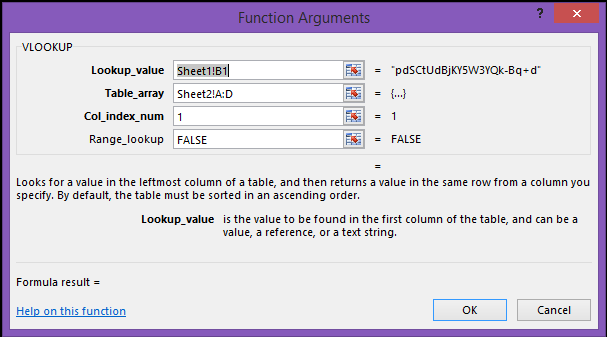
- In “Sheet3” of the Excel Spreadsheet please create the following formula in field A1
- In “Sheet3” drag the formula down the same number of rows that exist in “Sheet1”
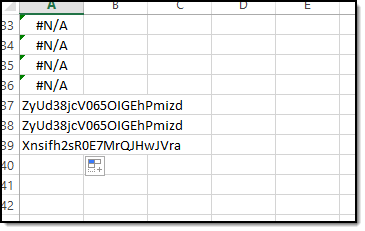
- Now look down through each row. The value of “#N/A” is good. If the field contains a GUID that indicates a container with a deleted parent container.
- Now you need to find the GUID of the container with a delated parent container. Take any above rows with a GUID and find them in “Sheet1”. Finding them are easy. The row number in sheet3 should corelate to the row number in “Sheet1”. Once you find the row in “Sheet1” make sure the GUID in column B matches the GUID from “Sheet3”. Once the container is found in “Sheet1” record the GUID.
- Lookup all fields in column “A” of “Sheet3” with a GUID and record the container name.
To Fix the Issue
- Once you have the GUID of all containers with deleted parent containers you will need to use history tools to set the “Container_ID” to null. Do this by placing the GUID of the container with a delated parent container in the “Where” clause of the following SQ. Place the modified SQL in history tools and run it. Select the option to set container_ID to null. Do this for each of the containers.
- select pc.CONTAINER_ID, pc.PROPERTY_CONTAINER_ID, pc.CREATED_TS, pc.CREATED_USER, pc.container_description from PROPERTY_CONTAINER pc where pc.DELETED_TS is null and pc.property_container_id = ‘’
Was this article helpful?
That’s Great!
Thank you for your feedback
Sorry! We couldn't be helpful
Thank you for your feedback
Let us know how can we improve this article!
Feedback sent
We appreciate your effort and will try to fix the article
X