
No recent searches
Popular Articles

Sorry! nothing found for
Viewing the Address History
Created by Russ Hartle, Modified on Tue, 27 May, 2025 at 10:39 AM by Russ Hartle
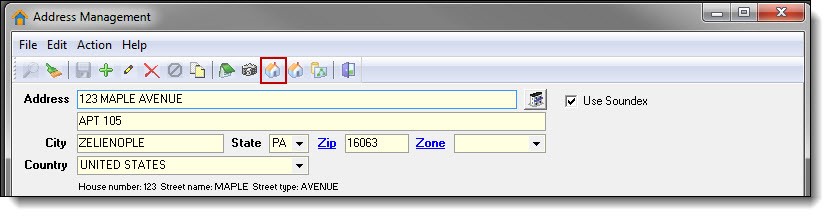
1. After an address has been searched and chosen, previous contact can be viewed through the Master Address Index. Click the “Master Address Index (MAI)” button to view the address history.
!Did You Know?
The Master Address Index is self-building. The more an address is used, the more information will be attached to its Master Index. Persons, calls, cases, etc. will show as tabs containing the related information.
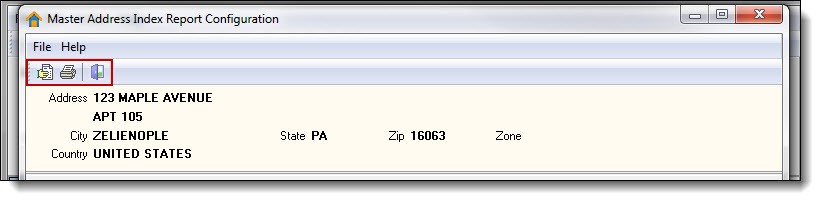
2. The MAI has three buttons at the top of the window; “Print Preview”, “Print”, and “Exit”. Previewing or printing the MAI places an address’ complete history into one document. To return to the Address Management window, click on the “Exit” button at the top of the MAI Report Configuration window.
Searching for Another Address
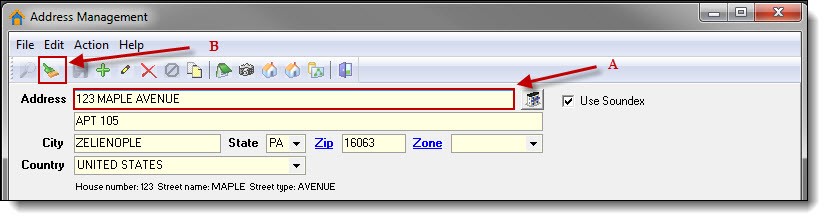
1. To search for an additional address, click inside the Address Line 1 box (A), and then click the “Clear” button (B).
*Tips:
The “Clear” button is useful anytime you want to start over and search for something new.
Was this article helpful?
That’s Great!
Thank you for your feedback
Sorry! We couldn't be helpful
Thank you for your feedback
Let us know how can we improve this article!
Feedback sent
We appreciate your effort and will try to fix the article
X