
No recent searches
Popular Articles

Sorry! nothing found for
WV Criminal Complaint - WV Criminal Complaint Report Break Down
Created by Russ Hartle, Modified on Mon, 31 Mar, 2025 at 10:30 AM by Russ Hartle
Illustrated below is the printable copy of the WV Criminal Complaint that is generated from within the In-Synch RMS.
This page will discuss where the information in the lettered sections is pulled from. This will help provide a complete understanding of how the WV Criminal Complaint is populated.
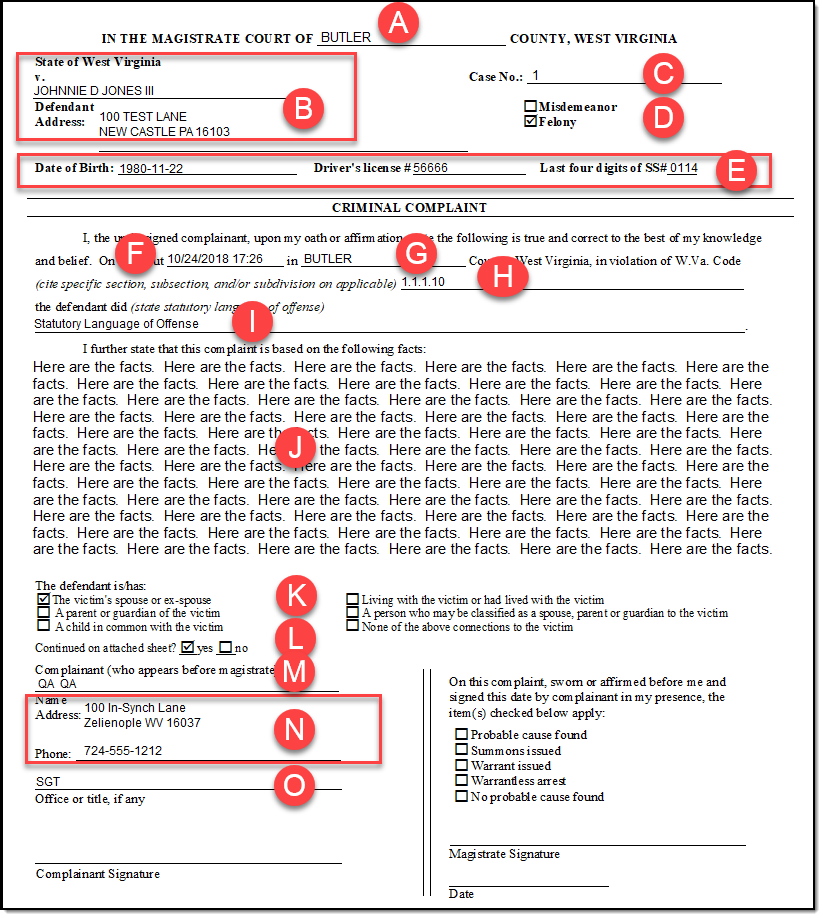
- A – This is the county of the arrest. By default, the arresting county is the county the agency resides in. If the arrest occurs in a different county it is possible to define that on the WV Criminal Complaint. To define a different county, the user must select a municipality/county combination that is correct for the case on the main Case Builder window.
- B – This is the defendant’s name and address entered into the Person Management Module.
- C – This is the magisterial case number entered on the WV Criminal Complaint data entry form. It is optional.
- D – Felony or Misdemeanor is determined by the classification of the code in Crime Code Management.
- E – The DOB, Driver’s Licenses Number, and last four of SSN are obtained from information entered into Person Management.
- F – This timestamp is obtained from the “Occurred From” timestamp on the main Case Builder window.
- G – This county is obtained in the same manner as the county discussed in step A above.
- H – The section is obtained from the code entered in Crime Code Management.
- I – The statutory language for the offense is entered on the WV Criminal Complaint data entry form.
- J – The facts information is entered in the “Affidavit” editor on the WV Criminal Complaint data entry form.
- K – The defendant/victim relationship is entered on the WV Criminal Complaint data entry form. A value of none will be automatically selected if a value is not chosen on the WV data entry form.
- L – The value of “Yes” or “No” is automatically ticked based on whether the facts section rolls over into additionally pages.
- M – The complaint is the arresting officer defined for the case in Case Contacts.
- N – The complaint address/phone number is the agency address/phone in the Agency Module.
- 0 – The officer title is obtained from the “Rank” defined on the “Employee Data” tab in the Personnel Module.
Was this article helpful?
That’s Great!
Thank you for your feedback
Sorry! We couldn't be helpful
Thank you for your feedback
Let us know how can we improve this article!
Feedback sent
We appreciate your effort and will try to fix the article
X