
Each window in ARMS has additional commands that are available under the Command menu item located on the menu bar.
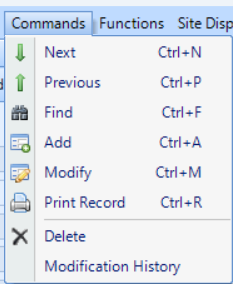
The mouse may be used to point and click on any command located under the Command menu. The following commands are available under the Command menu:
- Next – It goes to the next consecutive record entered into CAD.
- Previous – It goes to the previous record entered into CAD.
- Find – It puts the CAD into a write mode to allow users to enter search criteria and find existing records.
- Add – Puts the CAD into write mode and allows new information to be entered into every text field.
- Modify – Puts the CAD into write mode so that an existing record can be modified.
- Print Record – Prints the current record being displayed on the CAD face page.
- Delete – Deletes the current record being displayed in CAD. Delete is non-reversible.
- Modification History – Gives a list of all users who have modified the current record.