
The Available Units List is a display of all officers currently logged on. It includes their Unit number, their Beat, and their Location (as assigned when the officer was logged on). Units shown in the list are sorted by whether or not they have been assigned to a call. If an officer has been assigned to a call then their entry in the Available Unit List will be shown in red. If they are available to be assigned to a call then they will be shown in green.
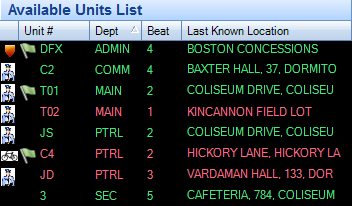
The Available Units List can be used to assign officers to calls by double-clicking on the desired officer when the CAD is in the Add or Modify mode.
The available units list can be sorted by Unit #, Beat o,r Current Location by clicking on the column headers.
