
If you are working on a NIBRS review dealing with "Seized" "Drug/Narcotics, and you are receiving the following error message.

To correct this error message you will need to select the "Seized" field and the "Drugs/Narcotics" field in both of the drop down lists of the Property section of the NIBRS Review.

One thing the user may run into is that they are unable to add a 'Property Drug Information' after adding the 'Description' and 'Type Property'. This occurs because it is disabled on the property section of NIBRS. To enable the drug information record button, the offense will need to be a 35A UCR Offense code. You can change this in the Offense tab. The user will then be able to proceed.

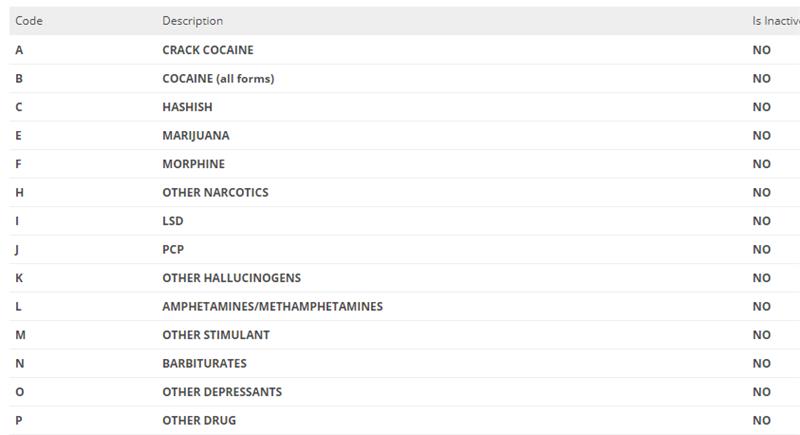
In the Property Drug info button, your drop-down list will be populated with your department's NIBRS codes from your code list. An example of what these drug records should be, are provided below.
After the user adds all of the appropriate fields to the NIBRS review, they are able to save the review, and check for any existing errors. If the user experiences any further errors that seem to not be manageable, please contact ARMS support.