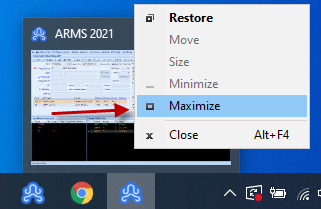
First make sure you have the off-screen window selected as the active window. You can do this by pressing Alt+Tab until that window is active or clicking the associated taskbar button.
If you hover your mouse over the ARMS CAD window (usually the second ARMS window on the start bar), you will see a small thumbnail of the CAD window (may look like below, may just show a blank grey screen). If you right click this thumbnail that appears and select Maximize, this will make the CAD screen open on your main monitor once again at full size.