
If your newly created user is unable to log in and your department uses SSO (Single Sign-On) you will want to check the following to ensure proper setup:
- The user has a user access profile.
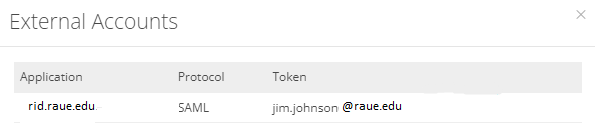
- The user's access profile has an external account attached to it with their SSO token (usually their organizational email), as shown below:
- The user is listed in your IdP as being able to access ARMS using SSO with the credential assigned to them and listed in their user access profile.
If the first 2 items are setup correctly, then you will need to contact your local IT to ensure the 3rd item is correctly configured.